

Issue with virtual background | Community
Skip to main content
Newcomer
January 3, 2025
Solved

Issue with virtual background

  • January 3, 2025
  • 2 replies
  • 5 views

A few updates ago, the Zoom app stopped showing my background when I had the Virtual backgrounds turned OFF! What I see is myself with a light blue gradient background. What am I missing? Is there a setting somewhere to set? The Zoom support bots were no help(endless loop of the same suggestions that don't work or don't apply). I appreciate any help anyone has to offer. 🙂

Best answer by YaBoiB

Hi @PiscesMac

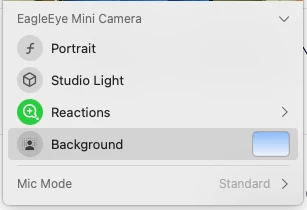
 I "think" that this might be your Facetime Camera mac background. Mac Sequoia has this new thing. It is really kind of cool where you can change the background of your camera. Can you check it and see if that is what is changing your background. It is a green icon at the top of your display, and when you click on it you will see what I see on the screenshot below. Let me know if this is the issue. 


2 replies

YaBoiB
Community Champion | Employee
January 3, 2025

Hello @PiscesMac


 When you go into settings on the Zoom Workplace desktop client and you click on virtual backgrounds do you see the none with a blue border around it like the screenshot I posted?

PiscesMacAuthor
Newcomer
January 3, 2025

Brandon,

 Thanks for responding. Yes, I hit the "NONE" option but I still get a blue gradient color around my image. I should have been clearer in my original post. 

PiscesMacAuthor
Newcomer
January 3, 2025

My bad, when I said the Virtual backgrounds were "OFF", I should have said I pressed the "NONE" option.  Yes, I did. I still see a light blue color gradient. Thanks for responding. I would post a pic but I don't have permission to upload images.

YaBoiB
Community Champion | Employee
YaBoiBAnswer
Community Champion | Employee
January 7, 2025

Hi @PiscesMac

 I "think" that this might be your Facetime Camera mac background. Mac Sequoia has this new thing. It is really kind of cool where you can change the background of your camera. Can you check it and see if that is what is changing your background. It is a green icon at the top of your display, and when you click on it you will see what I see on the screenshot below. Let me know if this is the issue. 


Newcomer
February 10, 2025

It worked! 


I've been struggling a while on this issue, many thanks!!!

LoL