International Dial-In Numbers for Philippines | Community
Skip to main content
Newcomer
January 29, 2022
Solved

International Dial-In Numbers for Philippines

  • January 29, 2022
  • 2 replies
  • 15 views

In the "Zoom International Dial-in Numbers" page:

In both columns for "international Number" and "Tollfree Number"

the Philippines shows a green check mark with no telephone number.

What does the green check mark mean?

Thank you.

    Best answer by jeremyjustin

    Hi @noelrelucio thank you for your post here on the Zoom Community! The green check mark basically means that your audio plan, for your Zoom tenant overall, supports using those phone numbers. However, they are not enabled for your use in the Zoom portal. Depending on whether this is your own account or if your account is under a main corporate/business tenant, you may be able to change this setting yourself, or you might not  😀

    To change these for your personal account, sign into the Zoom web portal at https://zoom.us

    Click on Settings, then the Audio Conferencing tab at the top
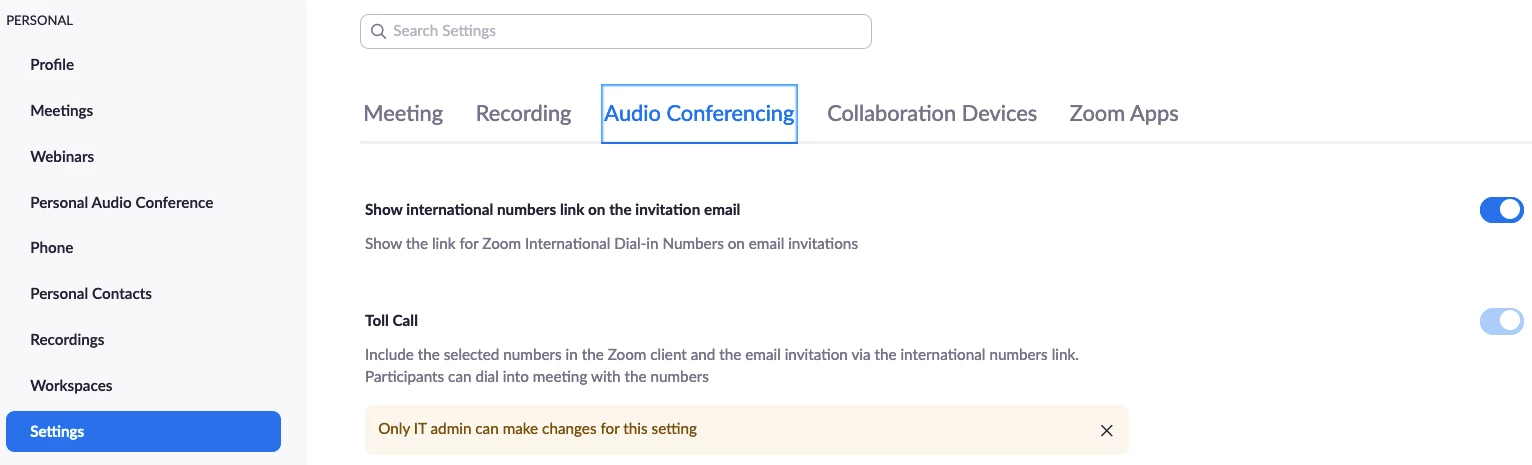
    In these settings you can click the little pencil icon to edit which numbers show up for you. There are settings for "Toll Call" which will show numbers that are toll, meaning Zoom will not charge you are the host anything when participants dial in. If you scroll down some, you see "Toll-free and Fee-based Toll Call" which are toll free numbers, and toll numbers in "premium" areas where it would cost your account something if people use those numbers. 


    You can see in the image above that for my account, an admin has locked the phone number settings so I can't edit them. If you are able to get into the Account settings, you can edit the phone numbers


    In the Zoom Web portal, go to "Account Management" and then "Account Settings." Click the "Audio Conferencing" tab at the top, now you will see the edit pencil icon
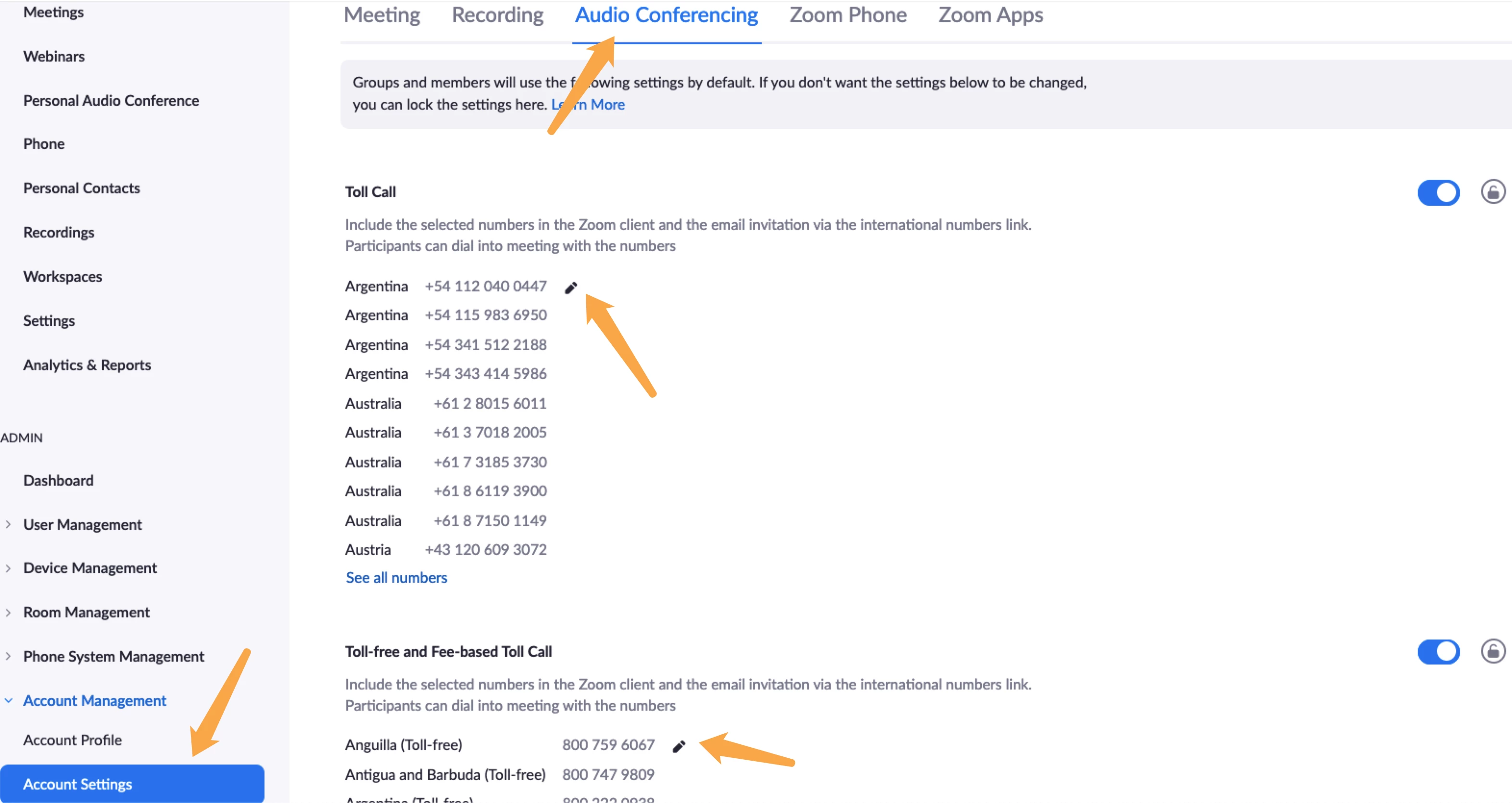
    Make your edits, then the next time you view the Zoom Dial-In numbers page you should see your changes reflected. 


    If this has answered your question to your satisfaction, please click the "Accept as Solution" button below but if not please reply and we can continue the  discussion. Thank you!

     

    2 replies

    jeremyjustin
    Community Champion | Employee
    Community Champion | Employee
    January 29, 2022

    Hi @noelrelucio thank you for your post here on the Zoom Community! The green check mark basically means that your audio plan, for your Zoom tenant overall, supports using those phone numbers. However, they are not enabled for your use in the Zoom portal. Depending on whether this is your own account or if your account is under a main corporate/business tenant, you may be able to change this setting yourself, or you might not  😀

    To change these for your personal account, sign into the Zoom web portal at https://zoom.us

    Click on Settings, then the Audio Conferencing tab at the top

    In these settings you can click the little pencil icon to edit which numbers show up for you. There are settings for "Toll Call" which will show numbers that are toll, meaning Zoom will not charge you are the host anything when participants dial in. If you scroll down some, you see "Toll-free and Fee-based Toll Call" which are toll free numbers, and toll numbers in "premium" areas where it would cost your account something if people use those numbers. 


    You can see in the image above that for my account, an admin has locked the phone number settings so I can't edit them. If you are able to get into the Account settings, you can edit the phone numbers


    In the Zoom Web portal, go to "Account Management" and then "Account Settings." Click the "Audio Conferencing" tab at the top, now you will see the edit pencil icon

    Make your edits, then the next time you view the Zoom Dial-In numbers page you should see your changes reflected. 


    If this has answered your question to your satisfaction, please click the "Accept as Solution" button below but if not please reply and we can continue the  discussion. Thank you!

     

    Newcomer
    January 14, 2025

    The green check mark on Zoom’s "International Dial-In Numbers" page for the Philippines indicates that the feature is supported, but no specific telephone number is displayed. For a deeper understanding of Philippine telecom prefixes, visit this website . It offers reliable information to quickly identify numbers from networks like Globe, Smart, and TNT, simplifying your communication needs.