Inspector | Community
Skip to main content
New Member
July 9, 2026
Solved

Inspector

  • July 9, 2026
  • 1 reply
  • 25 views

How do I stop Zoom from sending Meeting assets after a hearing.

    Best answer by ExpertswhoJohn

    hi ​@Cristian Mendoza-Muñoz 

    Welcome, yes you can limit who gets the summary in your settings. You can turn if off, or limit who receives the content.


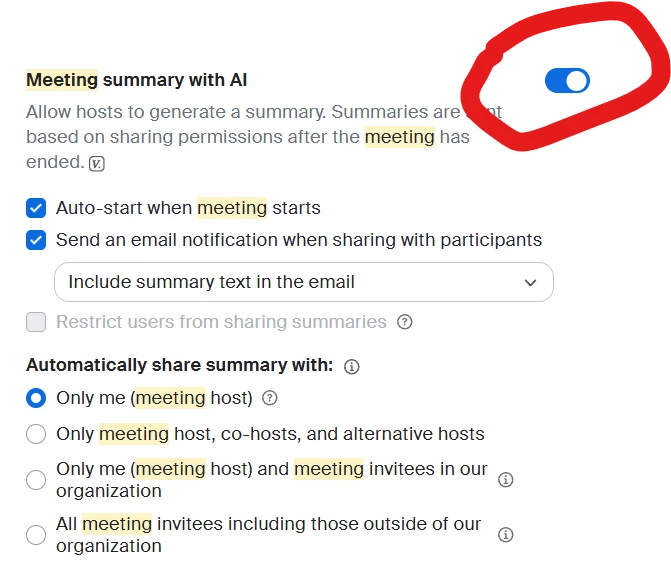
    To stop Zoom automatically sending post-meeting assets or AI summaries to participants:

    1. Sign in to the Zoom web portal.
    2. Go to Settings → Zoom AI.
    3. Open Meeting summary with AI.
    4. Under Automatically share summary with, select Only me (meeting host).
    5. Turn off Send an email notification when sharing with participants.
    6. Click Save.


    All the best

    John Drinkwater
    Zoom Community Super Champion
    I am not a Zoom Employee
    https://www.linkedin.com/in/johndrinkwaterlordzoom/
    https://www.youtube.com/@boomwithlordzoom



    1 reply

    ExpertswhoJohn
    Community Super Champion | Customer
    Community Super Champion | Customer
    July 11, 2026

    hi ​@Cristian Mendoza-Muñoz 

    Welcome, yes you can limit who gets the summary in your settings. You can turn if off, or limit who receives the content.


    To stop Zoom automatically sending post-meeting assets or AI summaries to participants:

    1. Sign in to the Zoom web portal.
    2. Go to Settings → Zoom AI.
    3. Open Meeting summary with AI.
    4. Under Automatically share summary with, select Only me (meeting host).
    5. Turn off Send an email notification when sharing with participants.
    6. Click Save.


    All the best

    John Drinkwater
    Zoom Community Super Champion
    I am not a Zoom Employee
    https://www.linkedin.com/in/johndrinkwaterlordzoom/
    https://www.youtube.com/@boomwithlordzoom