Increasing the meeting size? | Community
Skip to main content
Newcomer
August 20, 2021
Solved

Increasing the meeting size?

  • August 20, 2021
  • 1 reply
  • 3 views

So, my meeting was getting big, so I purchased a one-time $50 large-meeting add-on, to go to 500.  How can I tell if this was applied to my meeting, prior to folks trying to sign up and hitting a 100 person ceiling?  

    Best answer by Bort

    Hi @jar 

    There are 2 ways to check this: 

    1. Go to the Users page (under User Management) and check to see if Large500 is listed under the Type column for your profile. 
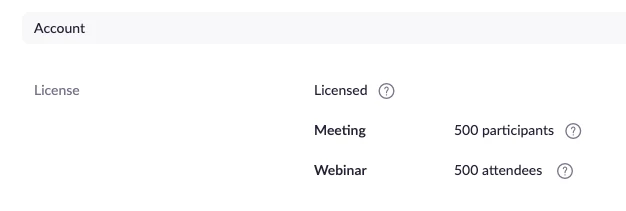
    2. Go to the Profile page and check the participant count next to Meeting, under the Account section: 

    Hope that helps and please make sure to mark the solution as accepted if this information is what you needed.

    1 reply

    Bort
    Employee
    BortAnswer
    Employee
    August 20, 2021

    Hi @jar 

    There are 2 ways to check this: 

    1. Go to the Users page (under User Management) and check to see if Large500 is listed under the Type column for your profile. 
    2. Go to the Profile page and check the participant count next to Meeting, under the Account section: 

    Hope that helps and please make sure to mark the solution as accepted if this information is what you needed.

    Newcomer
    November 13, 2021

    I added $50 add-on. Profile shows 500, but meeting is not letting registration exceed 100.

    Bort
    Employee
    Employee
    November 15, 2021

    You may have to go and edit the registration settings for that meeting to allow the increased registration count.