

How to remove videos completely | Community
Skip to main content
Newcomer
January 1, 2023
Solved

How to remove videos completely

  • January 1, 2023
  • 2 replies
  • 6 views

Hi!

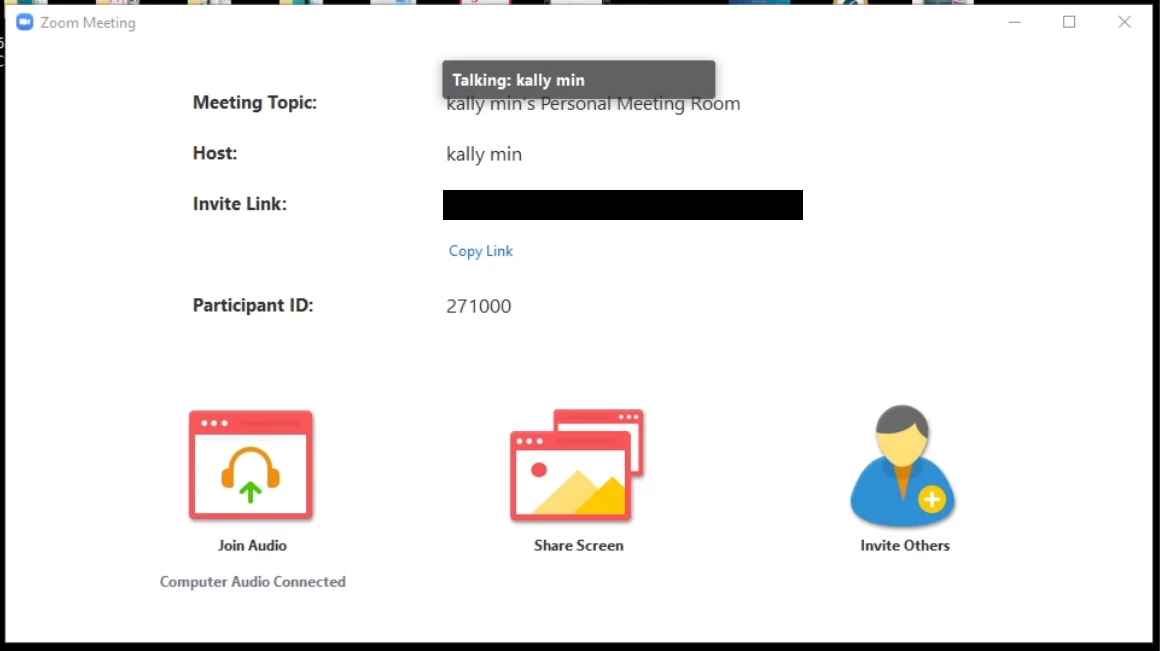
I recently had a call with someone where our videos were completely removed, not even our names or profile pictures were visible as is usually the case when you turn off your camera (see below).

I would really love to have the ability to do this with my clients on Zoom, but I can't figure out how to achieve this myself.

Can anyone please help me with this?

Thank you.


    Best answer by lol2

    This was in very old versions of Zoom, like 5.3.1 or something. They changed this a long time ago and you cannot enable/disable it manually in the newer versions. If you downgrade to 5.3.1 then it will force you to update when you try to join a meeting because it doesn't support most new Zoom features like whiteboards.

    2 replies

    Newcomer
    January 2, 2023

    Delete your own videos
    Sign in to YouTube Studio.
    From the left menu, select Content.
    Point to the video you'd like to delete and select More. Delete forever .
    Check the box to acknowledge that your video will be permanently deleted.
    Select DELETE FOREVER.

    ldmaxiAuthor
    Newcomer
    January 2, 2023

    I think you're misunderstanding me, I'm not trying to delete YouTube videos.

    I'm trying to have a Zoom call without the webcams or the participants' names/profile pictures as placeholders.

    See my screenshot above, that's how I would like the Zoom call to look like, but I don't know how to achieve this.

    Thank you.

    Ray_Harwood
    Community Super Champion | Customer
    Community Super Champion | Customer
    January 2, 2023

    Welcome to the Zoom Community, @ldmaxi.


    Your screen shot isn't of a Zoom meeting, and I'm not really sure from that what you're looking for.


    But from your description, I think you're describing what happens in a Webinar.  Only the speakers - typically called "Presenters" or "Panelists" are shown, perhaps along with a Host and any Co-Hosts.  All of the other people are "Attendees", and their camera and microphones are not normally on, and there is no list of the Attendees visible to other Attendees -- though the Panelists and Hosts/Co-Hosts can see them.


    This isn't really possible in a Zoom Meeting, though you can force participants camera video to be off... but their attendee "box" will still have either their name or their profile picture visible to others.


    Zoom Webinar is an add-on product.  If you're interested in more information, let me know.

    lol2Answer
    Newcomer
    January 2, 2023

    This was in very old versions of Zoom, like 5.3.1 or something. They changed this a long time ago and you cannot enable/disable it manually in the newer versions. If you downgrade to 5.3.1 then it will force you to update when you try to join a meeting because it doesn't support most new Zoom features like whiteboards.

    ldmaxiAuthor
    Newcomer
    January 3, 2023

    Thank you for your reply, this clears things up.

    I was looking like a madman through all the settings to replicate this.

    A shame this was removed, hopefully, they'll bring back this functionality in a future update.

    Thank you for clearing things up!