Hi @gtirloni
The setting you mentioned only affect Team Chat, the out-of-meeting chat, whereas you are wanting to disable the in-meeting chat notifications.
While in a meeting, you can click the ^ option next to the chat button and disable message previews.
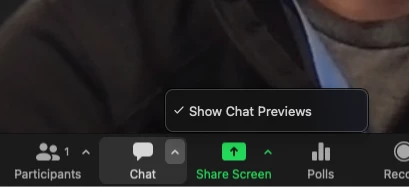
Not sure when exactly this option was added, but you should see if it you've updated the client recently. This seems to be persistent between meetings, so once its set, it should remain that way on that device until changed or reinstalled.
Hope that helps and please make sure to mark the solution as accepted if this information is what you needed.


