Hosts/Co-Hosts No Longer Able to Assign Directly from Waiting Room to a Breakout Room | Community
Skip to main content
Newcomer
January 24, 2026
Solved

Hosts/Co-Hosts No Longer Able to Assign Directly from Waiting Room to a Breakout Room

  • January 24, 2026
  • 5 replies
  • 387 views

When did hosts stop being able to assign directly from the waiting room to a breakout room? The new Zoom Workplace Application offered an amazing feature that allowed Host and Cohosts to view the waiting room, assign the participant to a breakout room and admit. The participant would go directly to the Breakout Room and bypass the main room. (Referenced in the “2 new features you might have missed” Article) My coworkers and I have noticed one by one we are losing that functionality. Can this be fixed?

Best answer by ExpertswhoJohn

hi All,

We have spoken with engeering and I have just tested it and find that the breakout room options now work as expected. Please make sure you have updated to the latest version 7
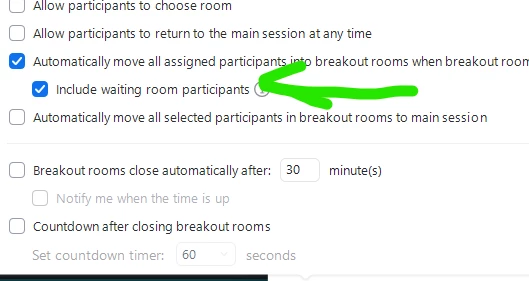
Take note of the extra tick box to relate to the waiting room people.
 

Please like and mark as the solution if this helps

All the best


John Drinkwater

Zoom Community Super Champion.

Zoom Developer Champion

Community Champions are not paid to provide this support and have no access to customer settings or data. I am not personally an employee of Zoom

https://www.linkedin.com/in/johndrinkwaterlordzoom/
See my latest content. events, live and prerecorded to showcase features
https://lordzoom.com/go/hub
I run many events and upload most on my channel.
https://www.youtube.com/@boomwithlordzoom
 

5 replies

Newcomer
January 30, 2026

Having the same issue. Any resolution? Started about 9 days ago.

Newcomer
February 2, 2026

No resolution, yet. 

Newcomer
March 18, 2026

This is a Problem! ​@zoom Please change it back, this makes what used to be a seamless transition clunky and sometimes awkward.

Bri
Community Manager
Community Manager
March 27, 2026

Hi ​@IPE, can you let me know which device/platform you’re noticing this on (MacOS/Windows/Web/Mobile)?

Newcomer
March 23, 2026

This has undermined my meeting security. Previously attendees were sent direct to a breakout room, for a visual check, before being allowed into the main session. Help bot has confirmed there is no workaround, I just have less secure meetings now. 

Bri
Community Manager
Community Manager
March 27, 2026

Hi ​@KellyJB, can you confirm which device/platform you’re noticing this on? MacOS/Windows/Web/Mobile?

Newcomer
March 28, 2026

I was on my Windows laptop, using the zoom workplace app. My co-host, who experienced the same issue, uses a MacBook.

ExpertswhoJohn
Community Super Champion | Customer
March 26, 2026

hi ALL,

I have tested and confirmed there is an issue and will follow up with engineering to have this looked at and resolved.

Please like and mark as the solution if this helps

All the best


John Drinkwater

Zoom Community Super Champion.

Zoom Developer Champion

Community Champions are not paid to provide this support and have no access to customer settings or data. I am not personally an employee of Zoom


ExpertswhoJohn
Community Super Champion | Customer
March 30, 2026

hi All,

We have spoken with engeering and I have just tested it and find that the breakout room options now work as expected. Please make sure you have updated to the latest version 7
Take note of the extra tick box to relate to the waiting room people.
 

Please like and mark as the solution if this helps

All the best


John Drinkwater

Zoom Community Super Champion.

Zoom Developer Champion

Community Champions are not paid to provide this support and have no access to customer settings or data. I am not personally an employee of Zoom

https://www.linkedin.com/in/johndrinkwaterlordzoom/
See my latest content. events, live and prerecorded to showcase features
https://lordzoom.com/go/hub
I run many events and upload most on my channel.
https://www.youtube.com/@boomwithlordzoom
 

Newcomer
March 31, 2026

Confirmed that the issue has been resolved. 

ExpertswhoJohn
Community Super Champion | Customer
March 26, 2026

hi everyone,

I have tested for you on lastest version 7
I can confirm that the user gets a crash error at thier end and does not get sent into the breakout room.
I have reported this and will be following this up for you as it is a trust and safety issue for you all.

Please like and mark as the solution if this helps

All the best


John Drinkwater

Zoom Community Super Champion.

Zoom Developer Champion

Community Champions are not paid to provide this support and have no access to customer settings or data. I am not personally an employee of Zoom


ExpertswhoJohn
Community Super Champion | Customer
March 31, 2026

ok, I have been able to create one situation where the problem does persist.

I am pretty sure it is down to old cache data issues. I suggest you turn off and then on again your waiting room.
let us know if you still find any propblems

John