

Host ScreenShares, Participant Screen Disappears | Community
Skip to main content
Newcomer
March 1, 2024
Solved

Host ScreenShares, Participant Screen Disappears

  • March 1, 2024
  • 3 replies
  • 7 views

When using the Zoom application with iPad, my screen (participant screen) disappears when the host screen shares. In the past, even if the host screen shares, the host and the (participant) screen were displayed along with the shared screen. But all of a sudden, the  participant screen is not displayed, but only the host screen. If I click the host screen and click on the gallery view, a window is added differently than before, so I can't see it on one screen [only  shared screen] or [only host and participant screen] by drag.

Is there a way to make all 3 shared screens, host screens, and participant screens appear on one screen as before without moving the screen?
Best answer by MichaelYuan

Hi @Jenny321 Thanks for posting your question here and sorry fro the inconvenience.


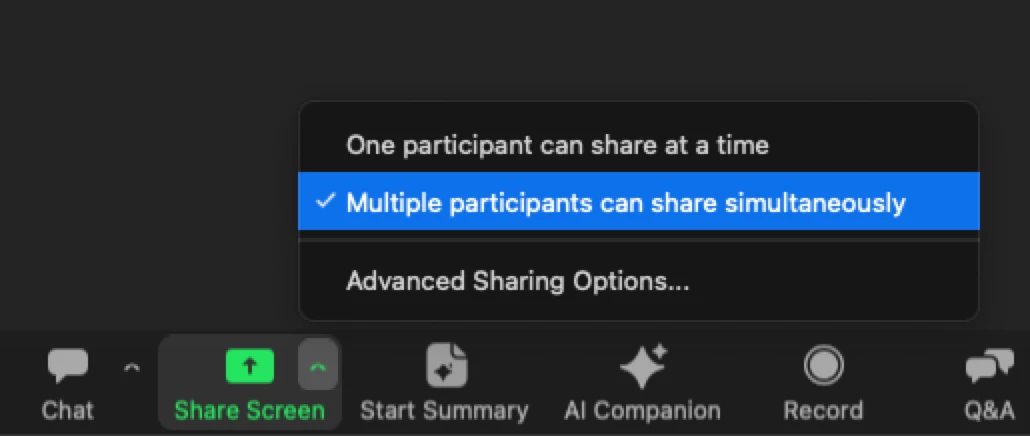
It mainly related with the multiple share. I think you can check the host share setting first. (On desktop client. There is no share settings on mobile client and one participant can share at a time when the host is using mobile client)


When enable multiple share from desktop client, you can switch shared screen from iPad if multiple sharing is received.


If you have any other questions, please let me know.

3 replies

Employee
March 4, 2024

Hi @Jenny321 Thanks for posting your question here and sorry fro the inconvenience.


It mainly related with the multiple share. I think you can check the host share setting first. (On desktop client. There is no share settings on mobile client and one participant can share at a time when the host is using mobile client)


When enable multiple share from desktop client, you can switch shared screen from iPad if multiple sharing is received.


If you have any other questions, please let me know.

Bri
Community Manager
Community Manager
March 7, 2024

Hi @Jenny321! Thank you for posting your question. @MichaelYuan has provided the solution for you, so I've marked it as an accepted solution. Please let us know if you need additional assistance! 

Newcomer
March 12, 2024

I am having this same issue. When you screen share a file you cannot see the participants at all.  Mobile has had this issue for a while but now I am having the issue with my ipad.  I would to share and see if anyone needs to speak or monitor without removing the screen share. 

Newcomer
May 21, 2024

I am having the same issue. I teach virtual classes and can’t see the student as soon as I share an image.