Help with virtual background and admin role | Community
Skip to main content
Newcomer
October 26, 2021
Solved

Help with virtual background and admin role

  • October 26, 2021
  • 6 replies
  • 6 views

Please can someone help me? I am trying to add virtual backgrounds to zoom yet it is saying that the admin has not allowed this... I am the admin and the owner of my zoom account. I need to be able to use specific backgrounds for my call tomorrow but I cannot add any new ones.  I can't find an email for Zoom or someone to talk to to help me.

    Best answer by ChrisO

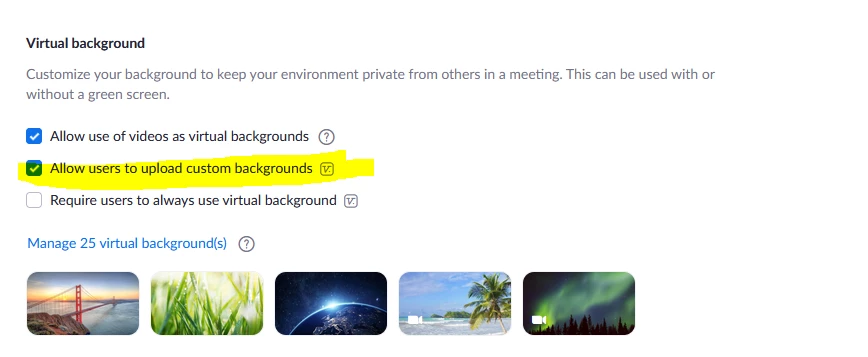
    If you are the admin then you need to look under Account Settings>>In Meeting (Advanced)>>Virtual Background and make sure the "Allow users to upload custom backgrounds" is checked.


    6 replies

    ChrisO
    Participant
    ChrisOAnswer
    Participant
    October 26, 2021

    If you are the admin then you need to look under Account Settings>>In Meeting (Advanced)>>Virtual Background and make sure the "Allow users to upload custom backgrounds" is checked.


    Newcomer
    March 4, 2023

    the box is ticked but i can't seem to get it on my background...so frustrating. Any ideas?


    Newcomer
    October 27, 2021

    Thank you so much, I did this yesterday and it didn't work but now it seems like it has, thank you for your help. 🙂 

    ChrisO
    Participant
    Participant
    October 27, 2021

    If you make a change on the admin side, you normally have to log out of the App and back in before you will see the change take effect.

    ThivishanR
    Newcomer
    Newcomer
    November 2, 2021

    try updating ur zoom


    ThivishanR
    Newcomer
    Newcomer
    November 2, 2021

    log out from the zoom app and again login


    Newcomer
    August 10, 2023

    I did all of this --nothing worked!

    Community Champion | Customer
    August 10, 2023

    Hello,

    Read this Zoom support article;

    How to enable Virtual Background

    https://support.zoom.us/hc/en-us/articles/210707503#h_2ef28080-fce9-4ac2-b567-dc958afab1b7 


    You have to enable it as admin at the account level and then enable it  in your own account as a user.


    Regards

    If my reply helped, don't forget to click the accept as solution button!