Getting message to install Zoom for meetings on my computer...I already have it | Community
Skip to main content
Explorer
June 7, 2026
Question

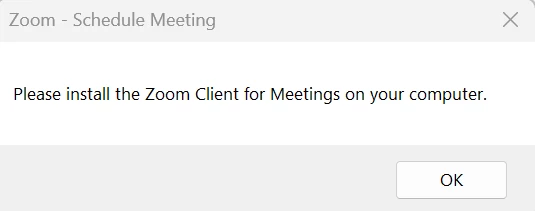
Getting message to install Zoom for meetings on my computer...I already have it

  • June 7, 2026
  • 4 replies
  • 93 views

When trying to send a change/update to a Zoom meeting via Outlook, I get this message and I’m prevented from sending the update.  I already have Zoom installed.  Why is this happening?


    4 replies

    Community Manager
    June 11, 2026

    Hello, ​@RJL! Happy to welcome you to the Zoom Community!


    I can understand how confusing this is, especially when Zoom is already installed on your computer and you're still being prompted to install it again. This usually happens because Outlook is not detecting the Zoom Outlook integration, not because the Zoom desktop app is missing. In other words, Zoom is installed, but the Outlook add-in or plugin that handles meeting updates may be disabled, outdated, or conflicting with another Zoom integration.


    Most Common Fixes:

    1. Update the Zoom Outlook Add-in

    Ensure you're using the latest version of the Zoom Outlook add-in. Outdated versions can trigger installation or detection prompts when sending meeting updates.


    1. Use Only One Zoom Outlook Integration

    If both the Zoom for Outlook Add-in and the legacy Zoom Outlook Plugin are installed, they may conflict. Remove or disable the older plugin and keep only the integration you actively use.


    1. Re-sign In to the Add-in

    Sign out of the Zoom add-in in Outlook, then sign back in to refresh the connection between Outlook and your Zoom account.


    I hope one of these suggestions points you in the right direction and helps get everything working smoothly again. If the issue continues after trying these steps, please feel free to share more details, and we'll be happy to look into it further

    RJLAuthor
    Explorer
    June 14, 2026

    How do I check whether I have both the Outlook add-in and the legacy Zoom Outlook Plugin?

    How do I sign out of the Zoom add-in?

    Community Manager
    June 17, 2026

    Hello, ​@RJL!


    Kindly follow the steps below and see if they help.


    Check for the legacy Zoom Outlook Plugin

    1. In Outlook, go to File → Options → Add-ins.
    1. Next to Manage, select COM Add-ins and click Go.
    1. Look for Zoom Outlook Plugin. If it's listed, the legacy plugin is installed.

    Check for the Zoom for Outlook Add-in

    • Classic Outlook: Go to Home → Get Add-ins (or Store).
    • New Outlook: Go to Apps/More Apps → Manage Apps.

    Search for Zoom for Outlook. If both Zoom for Outlook and Zoom Outlook Plugin are installed, you have both integrations.


    Sign out of the Zoom for Outlook Add-in

    1. Open a new or existing meeting in Outlook.
    1. Click Zoom in the ribbon.
    1. In the Zoom side panel, click your profile picture, initials, or the settings icon.
    1. Select Sign Out.
    1. Restart Outlook and sign back in.


    If you don't see a Sign Out option, you may be using only the legacy Zoom Outlook Plugin. In that case, sign out and back in through the Zoom desktop application instead. 

    Community Manager
    June 24, 2026

    Hello ​@RJL! Just checking in, have you had a chance to review my latest response to your concern?


    If it helped answer your question, feel free to mark it as the best answer so others in the community can benefit from it as well. If you still need any clarification or have additional questions, just let us know; we’re always here to help!

    RJLAuthor
    Explorer
    June 26, 2026

    I have not had a chance to try the solution you suggested.