Floating controls when sharing screen | Community
Skip to main content
Newcomer
October 5, 2021
Solved

Floating controls when sharing screen

  • October 5, 2021
  • 2 replies
  • 25 views

Hi there, 

I regularly host/co host meetings where we are required to share various images and videos with the participants. I am using a 2018 MacBook Air running Mac OS Big Sur. I play the media on my second monitor, which is connected via usb-c and share that screen. The trouble I have is the floating meeting controls jump between my Mac screen and my secondary display, and when the controls jump to the secondary display, all participants can see my controls and what I'm doing in the background, plus it looks untidy. Is anyone else having this problem? and why does is happen? Is there any way that I can pin the controls to one screen, so that they stay there all the time?? I'm just about at my wits end, please help!

Cheers

Jacko

    Best answer by Rupert

    Hi @Wacko_Jacko 


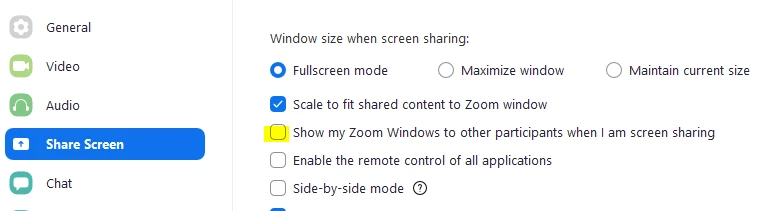
    You should be able to set or unset the visibility of your Zoom interface to other participants in your Zoom Settings, under Share Screen:


    Does this work for you?


    If participants are seeing what you are doing in other applications in the background on your second monitor, then you should look at sharing an application window only - rather than full screen.


    Hope this helps. Please post back with results.


    If this answers your question, please Accept as Solution.


    Thanks,


    Rupert

    2 replies

    Rupert
    Community Champion | Customer
    RupertAnswer
    Community Champion | Customer
    October 7, 2021

    Hi @Wacko_Jacko 


    You should be able to set or unset the visibility of your Zoom interface to other participants in your Zoom Settings, under Share Screen:


    Does this work for you?


    If participants are seeing what you are doing in other applications in the background on your second monitor, then you should look at sharing an application window only - rather than full screen.


    Hope this helps. Please post back with results.


    If this answers your question, please Accept as Solution.


    Thanks,


    Rupert

    Newcomer
    January 18, 2024

    Hi there,

    I have the same problem with floating meeting controls. All participants can see my controls and what I'm doing in the background. I tried to find the setting to set or unset the visibility of your Zoom interface to other participants. But unfortunately I don't have this setting that you highlight with yellow circle. What do I need to do now?
    Looking forward to your answer)


    Rupert
    Community Champion | Customer
    Community Champion | Customer
    October 9, 2021

    Hi @Wacko_Jacko 


    Did this resolve your question? Please Accept as Solution if it did - or past back if you need more help.


    Rupert