extra video box | Community
Skip to main content
Newcomer
March 22, 2022
Solved

extra video box

  • March 22, 2022
  • 1 reply
  • 0 views

Hello,

   I am having an extra picture frame showing one participant in addition to my gallery view.   I cannot seem to turn this off anywhere.  I also cannot figure out what to search to fix this issue.  When I hover over my desktop applications three screens show up as opposed to my usual two (zoom application and meeting) It is an extra single video showing.  For example, I just started a meeting with myself.  There were two frames of me.  I am just confused as to why this is happening.   I do have a laptop and another monitor set up for two screen use.  


Thank you for any help.

    Best answer by TomO

    Hello,

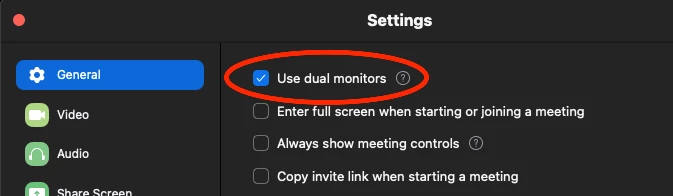
       In your Zoom settings, turn off Use Dual Monitors on the General tab. That should fix it. 

    Please mark this reply as an accepted answer if it resolves your issue.

    1 reply

    TomO
    Community Champion | Employee
    TomOAnswer
    Community Champion | Employee
    March 22, 2022

    Hello,

       In your Zoom settings, turn off Use Dual Monitors on the General tab. That should fix it. 

    Please mark this reply as an accepted answer if it resolves your issue.

    jpodje01Author
    Newcomer
    March 22, 2022

    Thank you so much TomO, this fixed it, Perfect!