Enable Original Sound has disappeared | Community
Skip to main content
Newcomer
October 11, 2023
Solved

Enable Original Sound has disappeared

  • October 11, 2023
  • 8 replies
  • 28 views

I have always used the Enable/Disable Original Sound option on the More menu in the iPad app. However, it is no longer present. The More menu has nothing that looks like this. I have found the same on two different Ipads. Has this been removed? I always needed it to deal with music and speech. 


 Thanks


 Julian

Best answer by Ray_Harwood

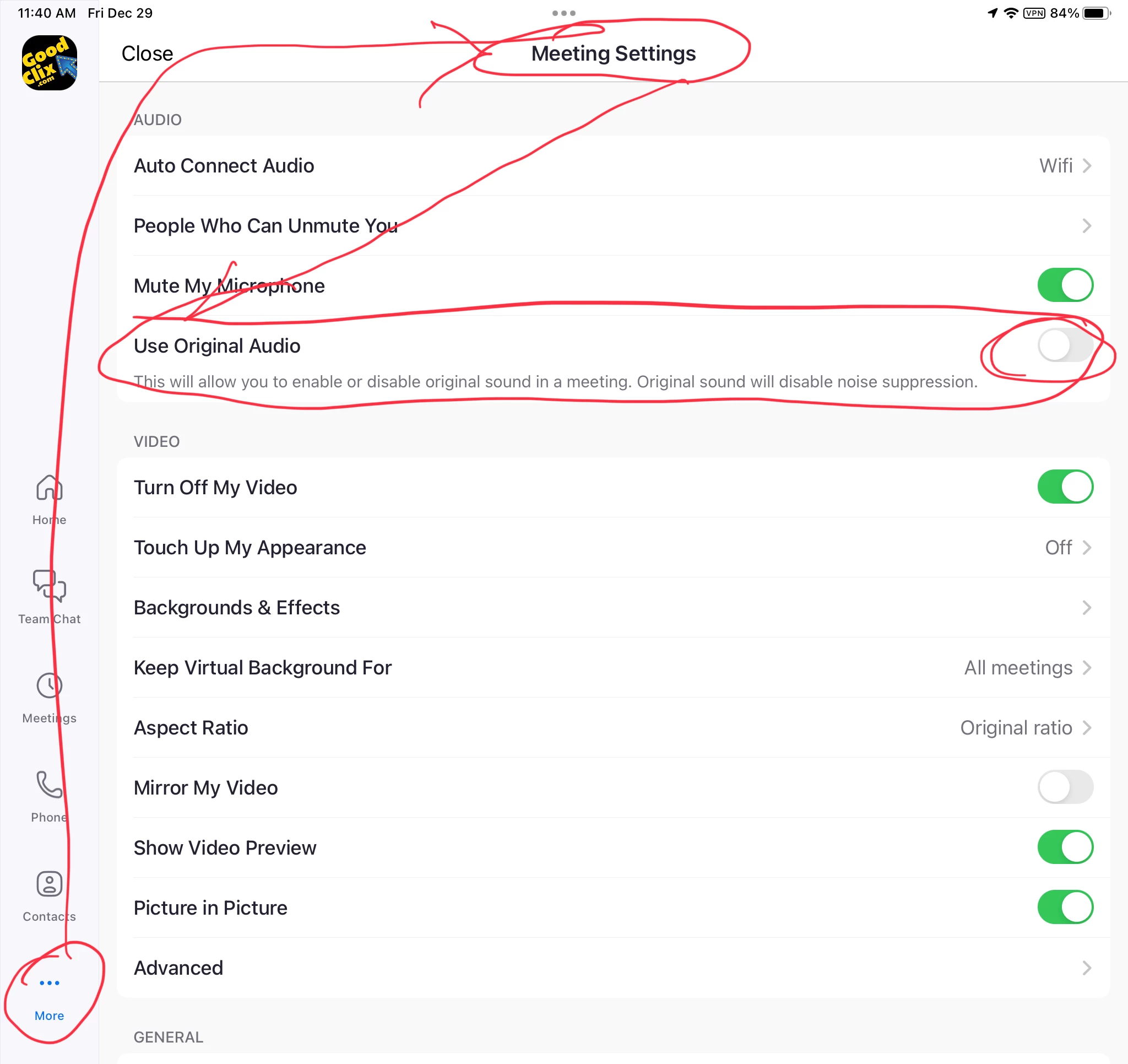
From iPad’s Zoom app, go to More, Meeting Settings, then enable the Use Original Audio setting:


8 replies

ExpertswhoJohn
Community Super Champion | Customer
October 12, 2023

Hi,


Go back the main zoom screen (can do inside a meeting)
click on the gear icon
Choose the meetings section and there you will find the audio settings, including original audio.

Please mark it as answered if this solves your query.

Newcomer
October 15, 2023

Thank you. You are right. That is the answer. Having the update to the app turn off that option is not a very helpful thing for Zoom to do. Why not just leave the settings as the user has set them?

Newcomer
November 1, 2023

Being able to enable the original sounds within the meeting is a MUST.  Please Zoom, put it back!!!

Ray_Harwood
Community Super Champion | Customer
December 29, 2023

From iPad’s Zoom app, go to More, Meeting Settings, then enable the Use Original Audio setting:


ExpertswhoJohn
Community Super Champion | Customer
November 2, 2023

If you go to the Audio section in settings, you can change the level of background noise suppression, set the original sound or try live-performance audio, which attempts zero latency.


You will need to ensure you are on the latest version of Zoom.


I hope that answers your question.

Newcomer
November 7, 2023

I can't find any settings icon!

ExpertswhoJohn
Community Super Champion | Customer
November 8, 2023

You can access the settings on the main Zoom page of the app from the gear icon.

Explorer
December 28, 2023

I not have that icon

Newcomer
September 10, 2024

Yes I do not have that icon either on my android. The instructions were for ipad...but what about Android.  I used to be able to toggle "enable original sound" but now it is no longer there and the live recording does not work. This is so frustrating when zoom changes these things and makes it worse. These things should be aseier to find as well. I have the settings right on my destktop version so it is not that. 

Newcomer
September 11, 2024

It seems the "Enable/Disable Original Sound" option may have been moved or removed in a recent update. Try checking the audio settings in the app or update it to the latest version. If it's still missing, reaching out to support might help.

Newcomer
September 11, 2024

I did all that. It's not there. I set in settings on my desktop version but still needs to be toggked on my phone in my zoom meeting....it's not there on my phone...looked everwhere

Newcomer
September 12, 2024

oh so that's really so I think you should try to contact with the support team,👨‍⚖️ they have some solution,

Newcomer
September 15, 2024

I can select original sound but my student can’t. Hopeless for a music lesson! We’ve had two wasted lessons. She can’t find an original sound option but we’ve been doing zoom lessons happily for at least two years without this problem. It’s so enfuriating.

Newcomer
August 6, 2025

I am having the same problem! And Zoom's help center has outdated information. What a pain!

Ray_Harwood
Community Super Champion | Customer
August 6, 2025

Welcome to the Zoom Community, @LaniDivine.


So you’re saying you’re on an iPad and can’t find the Original Sound for Musicians enable switch?

then:


Newcomer
August 10, 2025

I have latest 6.5.8 version and ENABLE ORIGINAL SOUND is not there after going to More and after I have checked Original sound musicians before the meeting!  The recorded and live music fades in and out and sometimes is not even audible. Ridiculous. I never had this problem last year!