Document Camera Windows 10 no choice under advanced sharing for second camera as in the KB article | Community
Skip to main content
Newcomer
August 29, 2021
Solved

Document Camera Windows 10 no choice under advanced sharing for second camera as in the KB article

  • August 29, 2021
  • 1 reply
  • 3 views

I am trying to share a second camera I do not see the option under advanced sharing.  I can switch between the cameras under video, so I know zoom recognizes the camera    All I see under advanced sharing is:
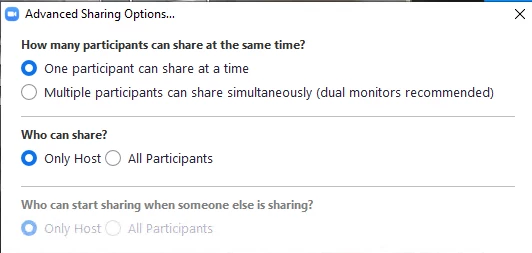
 

Does this require a paid account.  I can't find any documentation that says it does.   My primary camera is a Polycom studio.  My secondary camera is a Jabra Panacast.  Thank you.


Reference: Sharing your screen, content, or second camera – Zoom Help Center

    Best answer by Bort

    Hi @supertech 

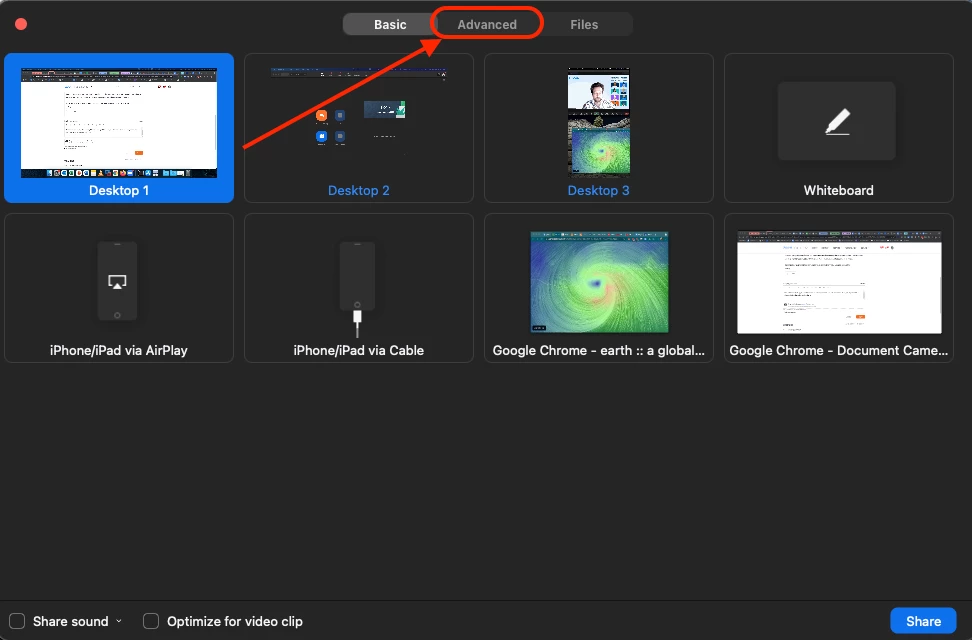
    You're close, but looking at the wrong Advanced settings. Click Share, and then when choosing what you want to share, switch to the Advanced tab there: 

    1 reply

    Bort
    Employee
    BortAnswer
    Employee
    August 29, 2021

    Hi @supertech 

    You're close, but looking at the wrong Advanced settings. Click Share, and then when choosing what you want to share, switch to the Advanced tab there: 

    supertechAuthor
    Newcomer
    August 29, 2021

    Thank you for your quick response.  Worked perfectly.   I am new to zoom.  I appreciate it.