Display name | Community
Skip to main content
Newcomer
August 28, 2021
Solved

Display name

  • August 28, 2021
  • 8 replies
  • 18 views

Hello,

My display name in my settings is different from my name that appears upon entering a meeting.  How can I match these?


Thanks!


    Best answer by Ohkawa

    Hi, SurfWriter


    If you join a Zoom meeting while you are signed in to Zoom, you will not be asked to enter the participant name, and you will join the meeting with the display name you set in your Web Portal profile.
    If you join a Zoom meeting without being signed in to Zoom, a window will appear asking you for the participant name, and by default, the login ID of your PC will be set.
    Of course, you can change the participant name (display name) manually. If you see a window to enter the participant name when you join a meeting, it means that you are joining without signing in.
    If you sign in when you join a Zoom meeting, you will join the meeting before the sign-in information is reflected, and the display name will be the same as when you joined as a guest, and the participant name confirmation window will appear.
    The way to prevent this is to set the Zoom application to start when the PC starts.

    See below.
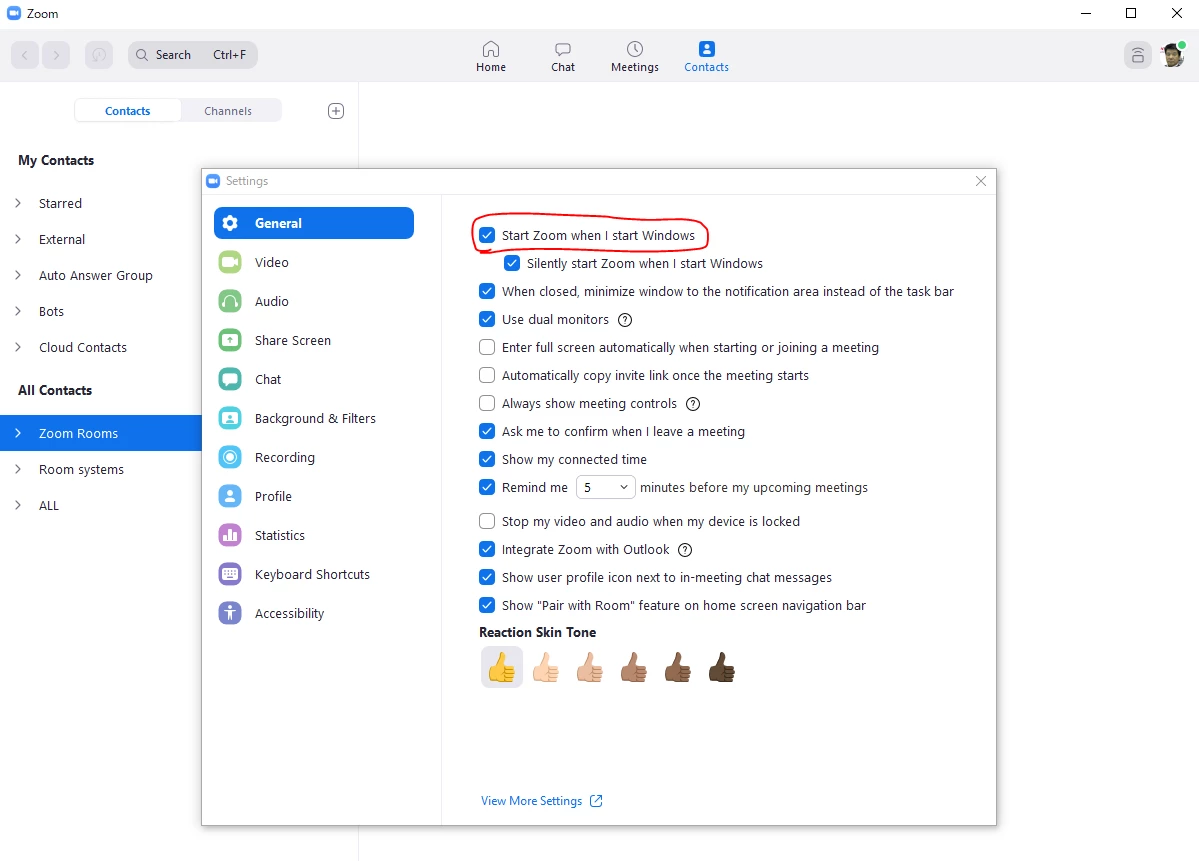
    If this solves your problem, please click Accept as Solution.

     

    8 replies

    Ohkawa
    Community Champion | Customer
    Community Champion | Customer
    August 29, 2021

    Hi,palex71

    I suggest you sign in to the Zoom website and change your profile.

    https://zoom.us


    Newcomer
    October 22, 2021

    My Display Name in my Profile is correct - and until the latest update, it displayed correctly when I attended a meeting.  Now it is a 6-digit number.  How do I fix this?

    Newcomer
    October 31, 2021

    I think I'm having a similar problem.  When I sign into a Zoom meeting, the little window for my identification as a participant shows the majority of my email address and not the Display Name that is shown in my account settings.  Why would I be seeing that email address as an ID instead of what I have as a Display Name? 

    Ohkawa
    Community Champion | Customer
    OhkawaAnswer
    Community Champion | Customer
    October 31, 2021

    Hi, SurfWriter


    If you join a Zoom meeting while you are signed in to Zoom, you will not be asked to enter the participant name, and you will join the meeting with the display name you set in your Web Portal profile.
    If you join a Zoom meeting without being signed in to Zoom, a window will appear asking you for the participant name, and by default, the login ID of your PC will be set.
    Of course, you can change the participant name (display name) manually. If you see a window to enter the participant name when you join a meeting, it means that you are joining without signing in.
    If you sign in when you join a Zoom meeting, you will join the meeting before the sign-in information is reflected, and the display name will be the same as when you joined as a guest, and the participant name confirmation window will appear.
    The way to prevent this is to set the Zoom application to start when the PC starts.

    See below.

    If this solves your problem, please click Accept as Solution.

     

    Newcomer
    October 31, 2021

    The solution you proposed is 100% correct. The problem developed when I installed an upgrade to zoom and it logged me out without my knowledge. Using your advice I log back in and everything is back to normal. Thank you

    palex71Author
    Newcomer
    January 4, 2022

    Hello,
    Since posting the original topic, this is now what I do:

    When given a Zoom link, for example,


    https://us02web.zoom.us/j/123456789


    I do NOT use it to enter the meeting. Instead, I open Zoom, click 'Join a Meeting' and then enter the meeting number from the URL. In this example above, it would be 123456789. I can then change my name for the meeting upon entering.

    melissac
    Newcomer
    Newcomer
    January 4, 2022

    Thank you so much! I'll try that.

    Newcomer
    March 17, 2022

    As is evident in this posting as well as many others (within Zoom forums and others sites), this is a common experience. And a frustrating one for users - for me, at least. This is an ISSUE and Zoom must acknowledge it.  However, save a few cursory/non-nuanced "solutions" by Zoom moderators and helpful samaritans, I don't see Zoom showing this in any Issues or Fixes list. That is not encouraging.

    Newcomer
    August 2, 2023

    I agree. I am still having this problem and it is really irritating. I went through a lot of work and expense to legally change my last name and I have updated my zoom profile, but I still have to go "rename" myself in every single meeting. Very annoying.

    Newcomer
    March 28, 2022

    I agree with this point . . . numbers are indicative of concern & problematic issues. A user base may just need to be "squeakier"  wheels!


    Newcomer
    October 19, 2022

     So the advice for enabling picture/name/video options to be under participant control is to NOT just click on the invite link in an email but rather FIRST sign in to your zoom account which I do on my PC through the Zoom app?

    Unfortunately I've tried either way and still when joining some meetings only my name will appear in the participant box.  I have the Video Setting icon in Do Not Display video (slashed out) mode.  I can never seem to get my profile picture displayed only my name (and even that is not the form of my name in my profile, its all lower case with no middle name as it is in my profile). Right clicking inside my participant rectangle will pop up a video options menus but there's no item for turning on profile picture and a choose camera at the top which shows the last camera I USB connected to my PC (my PC monitor has no built-in camera).  Very confused by all this, is this something that is controlled by some setting on the host invitee's device?  

    Ohkawa
    Community Champion | Customer
    Community Champion | Customer
    October 19, 2022

    Hi, @mapperboy 

    Are you having trouble displaying your profile picture?


    As far as I know, there are two cases where your own profile image registered in your Zoom account is not displayed.
    1. The host has set the focus mode.
    2. The administrator has prohibited the display of your profile image.


    Newcomer
    August 11, 2023

    I, too, am having issues with the Display Name. It is correct in my profile, but it always shows up as iPad when I’m in a meeting. I’ve reentered the information several times, but it doesn’t help. I have to ask the host to rename me every time. So annoying. Looks like this is a common problem. Zoom admins, you need to fix this!

    Newcomer
    November 23, 2023

    Certainly! To change your display name in Zoom, you can follow these steps:

    1. Open Zoom:

      • Launch the Zoom application on your computer or open the Zoom website.
    2. Sign In:

      • If you're not already signed in, log in to your Zoom account.
    3. Access Profile Settings:

      • Click on your profile picture or initials in the top-right corner.
    4. Edit Profile:

      • In the drop-down menu, select "Profile."
    5. Edit Your Name:

      • On the Profile page, you'll see your current name. Click the "Edit" button next to your name.
    6. Update Display Name:

    7. Save Changes:

      • Scroll down and click the "Save Changes" button.
    8. Restart Zoom:

      • Close and reopen the Zoom application to ensure that the changes take effect.

    After completing these steps, your updated display name should appear when you enter a Zoom meeting. If the changes don't reflect immediately, you might need to leave the meeting and rejoin for the updated name to be visible to others.