

Disabling Captions | Community
Skip to main content
Explorer
June 4, 2024
Solved

Disabling Captions

  • June 4, 2024
  • 1 reply
  • 4 views

I teach reading and spelling to children over Zoom and I want the captions disabled.  If a student puts captions on, they might see the spelling of what I'm saying plus it distracts them.  I know I can disable them after starting a meeting, but I have a different student every hour and I want to disable them BEFORE meetings start.  Is there a way for me to do that?
Best answer by tutor10

Hi, @tutor10.


Start at the Web Portal here: https://zoom.us/profile/setting


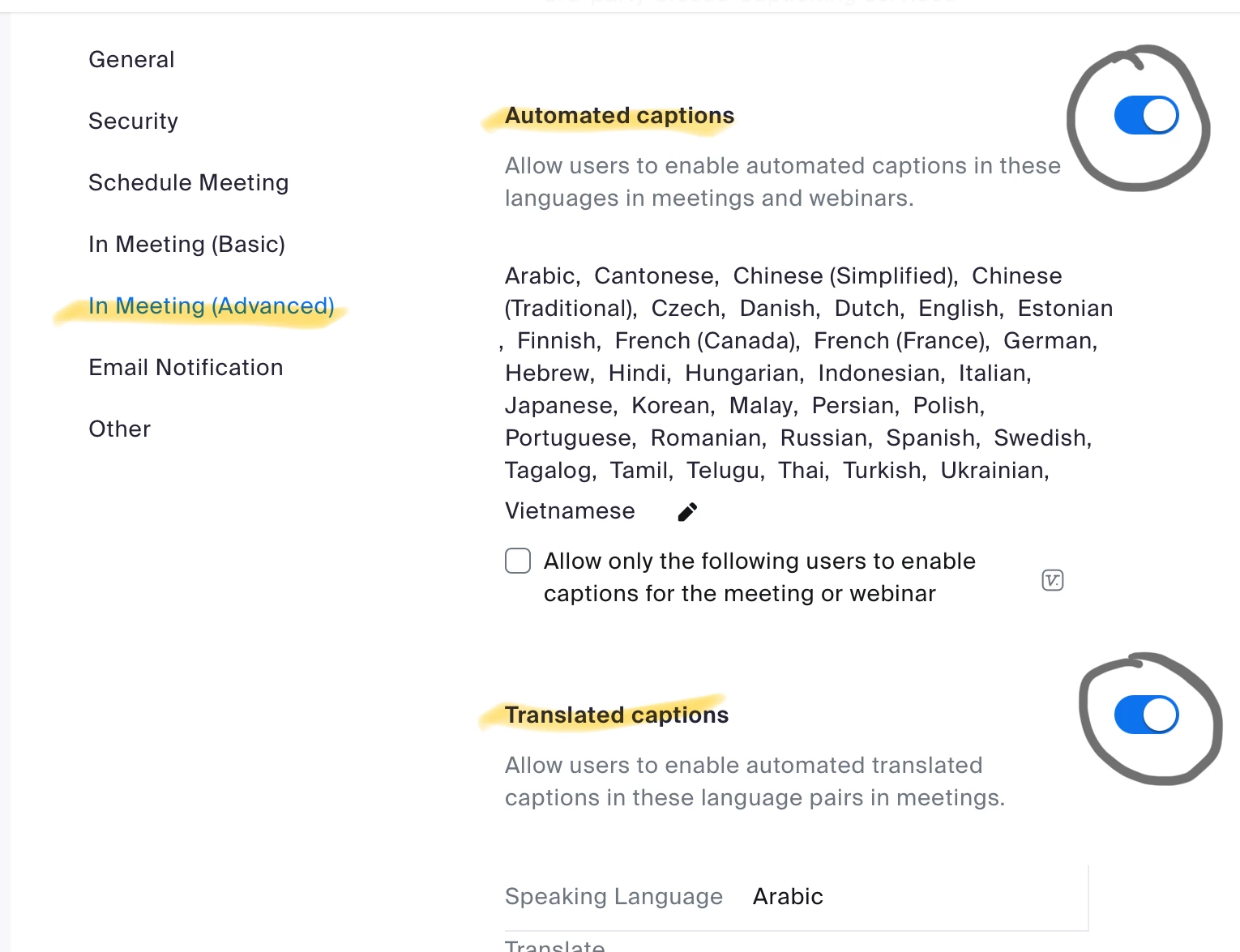
You might not have Translated Captions, but you can disable the Automated Captions. 


Thanks you so much!!!!! Perfect!

1 reply

storyhub
Community Super Champion | Customer
June 6, 2024

Yes, Sign in to the web portal. Go to settings > In Meeting (Advanced) > automated captions and turn it off.

tutor10Author
Explorer
June 10, 2024

Thanks you for your reply.  I don't have a place on settings that says "meetings" .  I'm attaching a screenshot that shows what settings are there. 

Ray_Harwood
Community Super Champion | Customer
June 11, 2024

Hi, @tutor10.


Start at the Web Portal here: https://zoom.us/profile/setting


You might not have Translated Captions, but you can disable the Automated Captions.