

Disable scribbling all over screen | Community
Skip to main content
Newcomer
October 20, 2023
Solved

Disable scribbling all over screen

  • October 20, 2023
  • 2 replies
  • 230 views

I work with a group of kids who discovered a way to scribble all over the screen as I'm presenting, as well as all the emojis at their disposal. Is there a way to disable this scribbling feature? I don't mind interactive chatting (to a limit) but the drawings are a bit disruptive. Grateful if you can help out!

Best answer by bstrelko

Sounds like you want to disable annotation.

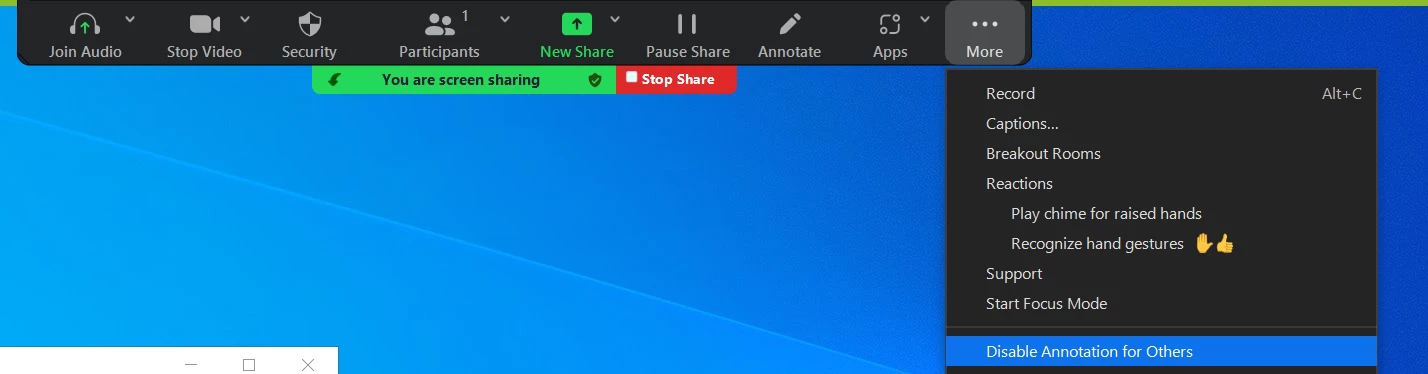
You can disable the annotation feature in your Zoom settings to prevent people from writing all over a screen share/whiteboard. To disable participant annotation, start your screen share / whiteboard session, then click on “More”, and click on “Disable annotation for others”.


You can also lock this down more broadly for the account via steps found here: https://support.zoom.us/hc/en-us/articles/4409894568845-Enabling-or-disabling-annotation-tools-for-meetings

2 replies

bstrelko
Community Champion | Customer
bstrelkoAnswer
Community Champion | Customer
October 20, 2023

Sounds like you want to disable annotation.

You can disable the annotation feature in your Zoom settings to prevent people from writing all over a screen share/whiteboard. To disable participant annotation, start your screen share / whiteboard session, then click on “More”, and click on “Disable annotation for others”.


You can also lock this down more broadly for the account via steps found here: https://support.zoom.us/hc/en-us/articles/4409894568845-Enabling-or-disabling-annotation-tools-for-meetings

DawnMAuthor
Newcomer
October 20, 2023

Thank you!!!! I'll try that out for next time. 

New Member
February 12, 2026

Ezt hol tudom “központilag” letiltani a webes felületen?
Sajnos nem találom rá a lehetőséget.