Defining keyboard shortcuts using a Mac laptop | Community
Skip to main content
Newcomer
November 6, 2023
Solved

Defining keyboard shortcuts using a Mac laptop

  • November 6, 2023
  • 1 reply
  • 87 views

Error codes: None

Device type: MacBook Pro running Sonoma 14.0

Zoom version: 5.16.6

Details: 


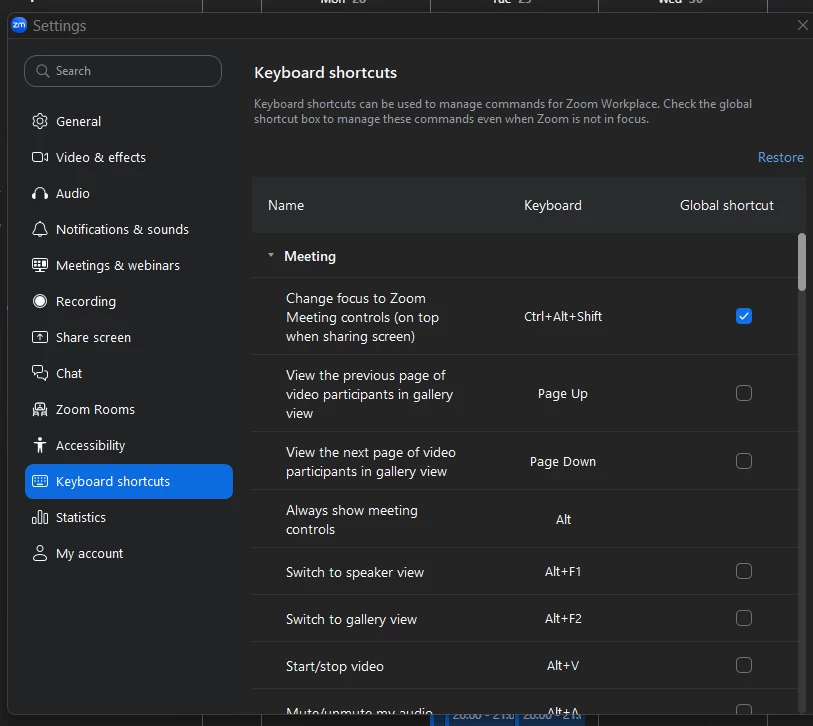
Am I losing my mind, or is it not possible to define/replace ZOOM keyboard shortcuts using the Mac laptop keyboard? I can set them up on my computer using an extended keyboard with keypad. But if I attempt to replace an existing shortcut (like to mute/unmute the audio or display/hide the my video) it won't allow me to edit the shortcut.


If I access the app using Screen Sharing, I can change only the shortcuts using ONLY the other keys - like Home or End. 


Is this defined anywhere? Do you need to use an extended keyboard in order to change/modify keyboard shortcuts? I didn't seen this mentioned anywhere. Or is there a Mac setting that would prohibit me from editing them?


Thanks,

GMAN55

Best answer by ExpertswhoJohn

hi ​@GMAN55 ,

You can change them the same way as on windows. in the settings, choose shortcuts and then click on the sortcut you want to change


All the best


John Drinkwater

Zoom Community Super Champion

I am not a Zoom Employee

https://www.linkedin.com/in/johndrinkwaterlordzoom/

https://www.youtube.com/@boomwithlordzoom


1 reply

ExpertswhoJohn
Community Super Champion | Customer
September 14, 2026

hi ​@GMAN55 ,

You can change them the same way as on windows. in the settings, choose shortcuts and then click on the sortcut you want to change


All the best


John Drinkwater

Zoom Community Super Champion

I am not a Zoom Employee

https://www.linkedin.com/in/johndrinkwaterlordzoom/

https://www.youtube.com/@boomwithlordzoom