Create small group chat within zoom meeting | Community
Skip to main content
New Member
June 17, 2026
Solved

Create small group chat within zoom meeting

  • June 17, 2026
  • 5 replies
  • 45 views

Hi, last week I used Zoom Pro account (for 100 participants) and I could create small group chat with a few participants in my meeting. Then my Zoom Pro account expires and I joined a team (organization), now I can host meeting with 300 participants. But I could no longer create small group chat in my meeting anymore. Now the chat windows doesn’t have the button to “create new chat”, instead I could only chat in the same windows like the old Zoom (2 years ago).

Does anyone face the same problem?

    Best answer by ExpertswhoJohn

    hi ​@Anh-Tuấn Trần ,


    You create a private group in chat the same way for all account types.

    But it may be that the admin of the org you have joined does not have the same account settings enabled and  that is why

    Zoom Web Portal → Account Management → Account Settings → Meeting → In Meeting (Basic)

    Look for:

    Meeting chat - Direct messages

    Turn that off to stop participants privately messaging each other. Account owners/admins can apply this at account or group level, and can lock it so users cannot change it.

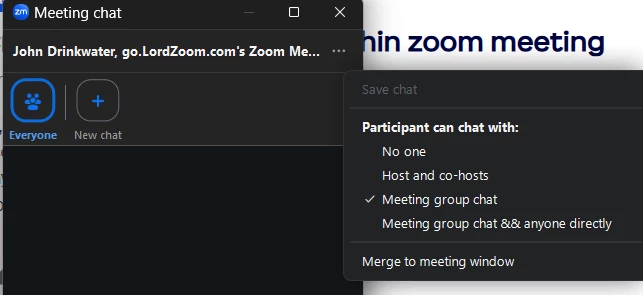
    You can also leave meeting chat on but set the default participant chat permission to:

    it is also possible to turn off in the chat options of a meeting.

    I hope that helps.


    All the best


    John Drinkwater

    Zoom Community Super Champion

    I am not a Zoom Employee

    https://www.linkedin.com/in/johndrinkwaterlordzoom/

    https://www.youtube.com/@boomwithlordzoom


    5 replies

    ExpertswhoJohn
    Community Super Champion | Customer
    Community Super Champion | Customer
    June 17, 2026

    hi ​@Anh-Tuấn Trần ,


    You create a private group in chat the same way for all account types.

    But it may be that the admin of the org you have joined does not have the same account settings enabled and  that is why

    Zoom Web Portal → Account Management → Account Settings → Meeting → In Meeting (Basic)

    Look for:

    Meeting chat - Direct messages

    Turn that off to stop participants privately messaging each other. Account owners/admins can apply this at account or group level, and can lock it so users cannot change it.

    You can also leave meeting chat on but set the default participant chat permission to:

    it is also possible to turn off in the chat options of a meeting.

    I hope that helps.


    All the best


    John Drinkwater

    Zoom Community Super Champion

    I am not a Zoom Employee

    https://www.linkedin.com/in/johndrinkwaterlordzoom/

    https://www.youtube.com/@boomwithlordzoom


    New Member
    June 17, 2026

    To clarify, I CAN chat privately with participants, just that my zoom meeting chat box now is back to the old Zoom chat box where all messages are in the same threads (including private messages to individual participants, with (private chat) after their names).

    My Zoom admin already turned on private chat (that’s why I CAN chat privately), but my Zoom chat window does not have “New chat” button. That’s why I’m really confused. My Zoom chat does not even have the “everyone” button like yours.

    I want to bring the “new chat” button back because I can only create small private group chat with “New Chat” button.


    New Member
    June 17, 2026

    To clarify, I CAN chat privately with participants, just that my zoom meeting chat box now is back to the old Zoom chat box where all messages are in the same threads (including private messages to individual participants, with (private chat) after their names).

    My Zoom admin already turned on private chat (that’s why I CAN chat privately), but my Zoom chat window does not have “New chat” button. That’s why I’m really confused. My Zoom chat does not even have the “everyone” button like yours.

    I want to bring back because I can only create small private group chat with “New Chat” button.


    ExpertswhoJohn
    Community Super Champion | Customer
    Community Super Champion | Customer
    June 17, 2026

    @Anh-Tuấn Trần ,

    As I said, that could have been stopped by the owner of the Zoom account- the account holder.

    John

    New Member
    June 17, 2026

    The strange thing is the account holder already turns that option on (the “Meeting chat - Direct messages” is already on in their side). That’s why I’m very confused.

    ExpertswhoJohn
    Community Super Champion | Customer
    Community Super Champion | Customer
    June 17, 2026

    Great ​@Anh-Tuấn Trần ,

    What are your account settings? Maybe yours is turned off by default.


    All the best


    John Drinkwater

    Zoom Community Super Champion

    I am not a Zoom Employee

    https://www.linkedin.com/in/johndrinkwaterlordzoom/

    https://www.youtube.com/@boomwithlordzoom


    ExpertswhoJohn
    Community Super Champion | Customer
    Community Super Champion | Customer
    June 17, 2026

    @Anh-Tuấn Trần ,

    You should have this


    So things are missing from your settings!

    Your admin has turned off something, or they have you in a group of users where that option is turned off.
    Otherwise, your settings could have been corrupted when you joined this new org.
    Are you using the same email address?
     

    All the best


    John Drinkwater

    Zoom Community Super Champion

    I am not a Zoom Employee

    https://www.linkedin.com/in/johndrinkwaterlordzoom/

    https://www.youtube.com/@boomwithlordzoom


    New Member
    June 17, 2026

    Actually I have all the options for chat, like the images below. So reallyyyyy! I don’t know what’s missing or what’s wrong.


    ExpertswhoJohn
    Community Super Champion | Customer
    Community Super Champion | Customer
    June 17, 2026

    hi ​@Anh-Tuấn Trần ,
    Direct messages are not the setting; that is to do with group messages, not in meetings.


    All the best


    John Drinkwater

    Zoom Community Super Champion

    I am not a Zoom Employee

    https://www.linkedin.com/in/johndrinkwaterlordzoom/

    https://www.youtube.com/@boomwithlordzoom