Changing local save location
Earlier versions of Zoom it was easy to make changes. All I want to do is change the location of my local saves. Everything online is years old.
Can you put me out of my misery? Lord they make things hard.

Earlier versions of Zoom it was easy to make changes. All I want to do is change the location of my local saves. Everything online is years old.
Can you put me out of my misery? Lord they make things hard.
Hi @Koop @SifuZPE sorry that it appears to be difficult to change the location of your local recording files. Do you mind sharing what has changed that makes the file location for local recordings more difficult as the user? Please see the documentation for Finding and viewing local recordings, hoping this helps clears some things up a bit. If you have any feedback, please let us know what didn't work for you, I would love to further help or share any feedback. Looking forward to hearing from you!
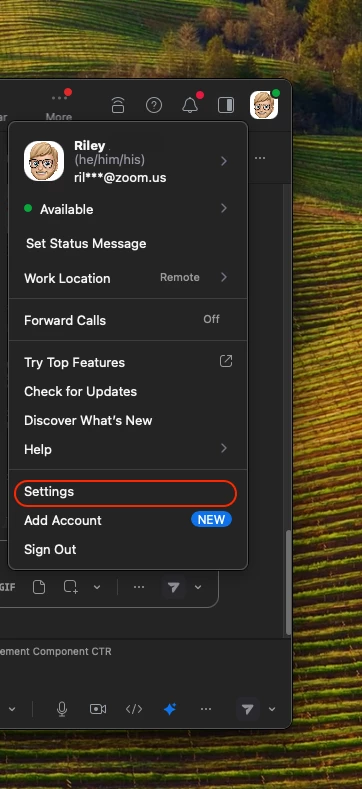
Here is my POV of how to change my local recording file location. From the Zoom Desktop click on your profile > settings

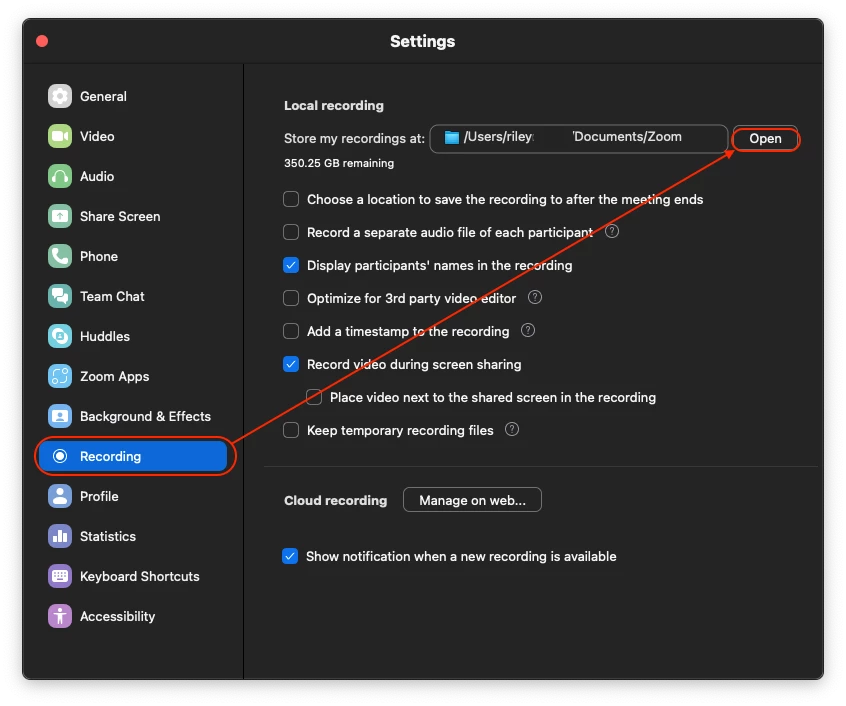
From here, click "Recording" on the left-hand side and click "open" as to where you'd like your local recordings to be stored.

Enter your E-mail address. We'll send you an e-mail with instructions to reset your password.