

cannot update nor uninstall zoom after using CleanZoom.exe and uninstalling Norton | Community
Skip to main content
Newcomer
January 17, 2024
Solved

cannot update nor uninstall zoom after using CleanZoom.exe and uninstalling Norton

  • January 17, 2024
  • 2 replies
  • 10 views

My current version of zoom is 5.16.10 - been trying to update it to 5.17.2.


I tried to uninstall Zoom (using CleanZoom.exe) in order to reinstall it - that is after uninstalled Norton but still present the following error code:


"The file 'C:\ProgramData\Norton\{0C55C096-0F1D-4F28-AAA2-85EF591126E7}\Updater\' is not valid installation package for the product Zoom ...."


Obviously, I can't update it via Norton Software Updater in the first place, thus uninstalling Norton.

But since I can't even uninstall Zoom after uninstalling Norton, I really do not know what else I can do to update Zoom.  I am operating at Admin level on my notebook running on Windows.


Thank you for reading and your help will be much appreciated.


Best answer by EC101


Thanks @RN52_2,  the problem has been resolved using Microsoft Troubleshooter to uninstall Zoom and now the latest version of Zoom has been reinstated.

Big thanks for your help!  🙂

2 replies

Newcomer
January 19, 2024

Having the same issue. Cannot update nor remove Zoom. Same error as above.

Community Manager
January 23, 2024

Hi @EC101 @AudioDave welcome to the community! Very interesting issue you're having here as i believe this maybe a system settings issue within Windows, specifically around your installers for files and applications. I tried looking up past cases and yours seems to be pretty unique as I was not finding much for other cases around this. However, If you're able to provide a screenshot of the exact error? Did a google search "is not valid installation package for the product windows" and came up with the following results here or some suggestions within this other resource where there seems to be some info around this, maybe. The file destination is unique to you, so I couldn't leverage much as to searching for other cases that maybe related to yours for suggestions; however, I would suggest checking those resources out to determine if this is a windows issue rather than a Zoom installer issue.

Newcomer
February 8, 2024

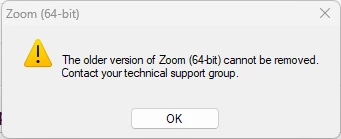
I downloaded the msi file and verified that it ran. However in attempting to uninstall, I point the prompt to the msi file on the desktop and still get similar errors below:


As I said already, I cannot uninstall Zoom, even after downloading the msi file.


Newcomer
February 8, 2024