Cannot share documents in Zoom Meeting | Community
Skip to main content
Newcomer
October 3, 2024
Solved

Cannot share documents in Zoom Meeting

  • October 3, 2024
  • 3 replies
  • 28 views

Hello.  I am on Version: 6.2.0 (1855) and when I try to share my screen or a document with my meeting participants, I get a black screen.  I can't see anything and neither can they.  The only thing I can share successfully, is the Whiteboard.  Any ideas?

Best answer by YaBoiB

Hello @sktnggtr


 If you would please. Read through this support document here and see if any of this applies to your situation. 

https://support.zoom.com/hc/en/article?id=zm_kb&sysparm_article=KB0060527

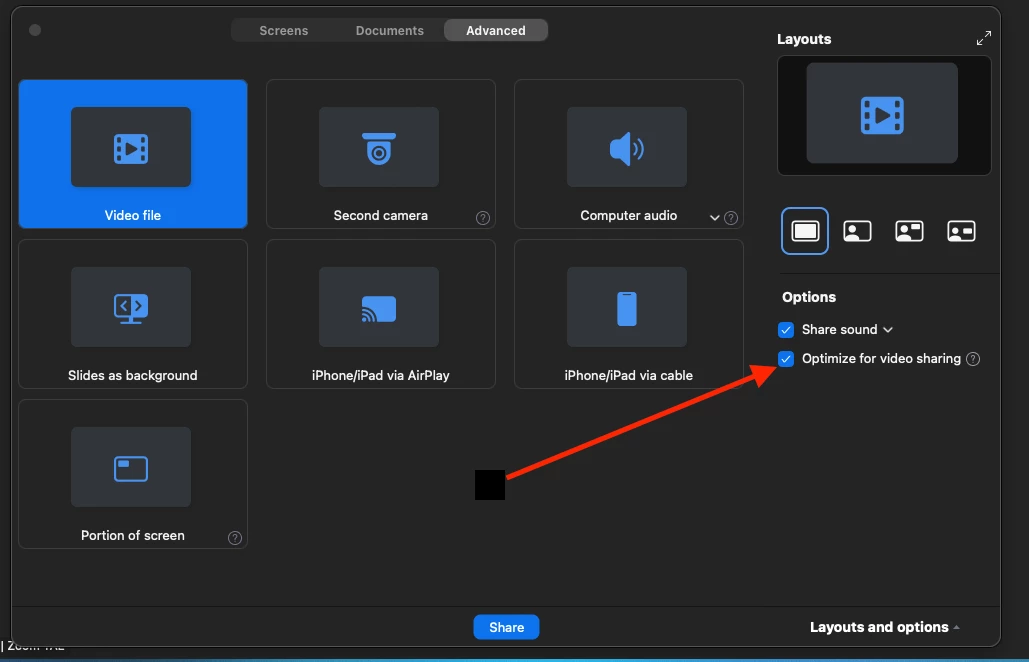
If not, check to see that you are not using "optimize for video sharing" to get to this setting, start a Zoom meeting> click on share screen button > click on the advanced tab > uncheck Optimize for video sharing. When this is checked (enabled) your Zoom screens will show up as black boxes. Another setting that you can enable if you so choose is "show my Zoom windows when screen sharing" this can also work with optimizing for video if it is enabled. I will share both settings screenshots below to help you find them. 
3 replies

YaBoiB
Community Champion | Employee
YaBoiBAnswer
Community Champion | Employee
October 3, 2024

Hello @sktnggtr


 If you would please. Read through this support document here and see if any of this applies to your situation. 

https://support.zoom.com/hc/en/article?id=zm_kb&sysparm_article=KB0060527

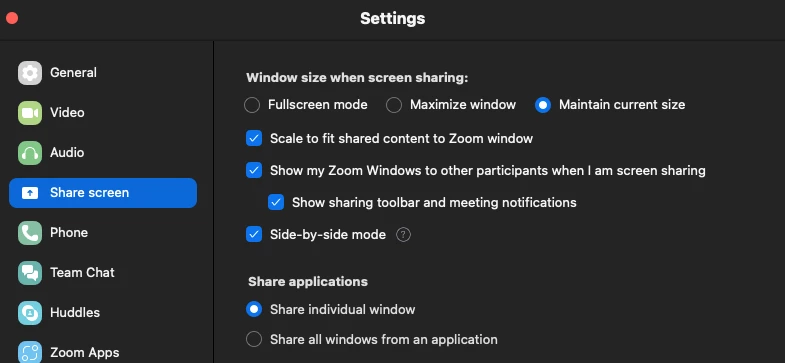
If not, check to see that you are not using "optimize for video sharing" to get to this setting, start a Zoom meeting> click on share screen button > click on the advanced tab > uncheck Optimize for video sharing. When this is checked (enabled) your Zoom screens will show up as black boxes. Another setting that you can enable if you so choose is "show my Zoom windows when screen sharing" this can also work with optimizing for video if it is enabled. I will share both settings screenshots below to help you find them. 
MGSR
Community Manager
Community Manager
October 11, 2024

Hi @sktnggtr!

Did you see the previous response from @YaBoiB?
If it has resolved your inquiry, please press Accept as Solution.

If you need further assistance, please let us know.

Have a great day!

MGSR
Community Manager
Community Manager
October 21, 2024

Hi @sktnggtr!

Given the time elapsed since we last heard from you, I've taken the liberty of marking the provided answer as the solution.

If you need further assistance, please let us know.

Have a fantastic day!


