

Cannot schedule recurring meeting anmore without end date | Community
Skip to main content
Newcomer
December 4, 2022
Solved

Cannot schedule recurring meeting anmore without end date

  • December 4, 2022
  • 16 replies
  • 24 views

I used to schedule recurring meetings with no end date or number of occurrences. Now I am forced to choose and end date or a number of occurrences. If I choose for example "End date: 50 occurences", then all 50 meetings are listed on the left under upcoming meetings. That is totally annoying. How do I get around that? Also, it used to say "this is an ongoing meeting - meet anytime". I don't see that option anymore either. If I pick a certain time or date, can I still meet anytime?


Thanks for your help
    This topic has been closed for replies.
    Best answer by Frank_TB

    Hello,


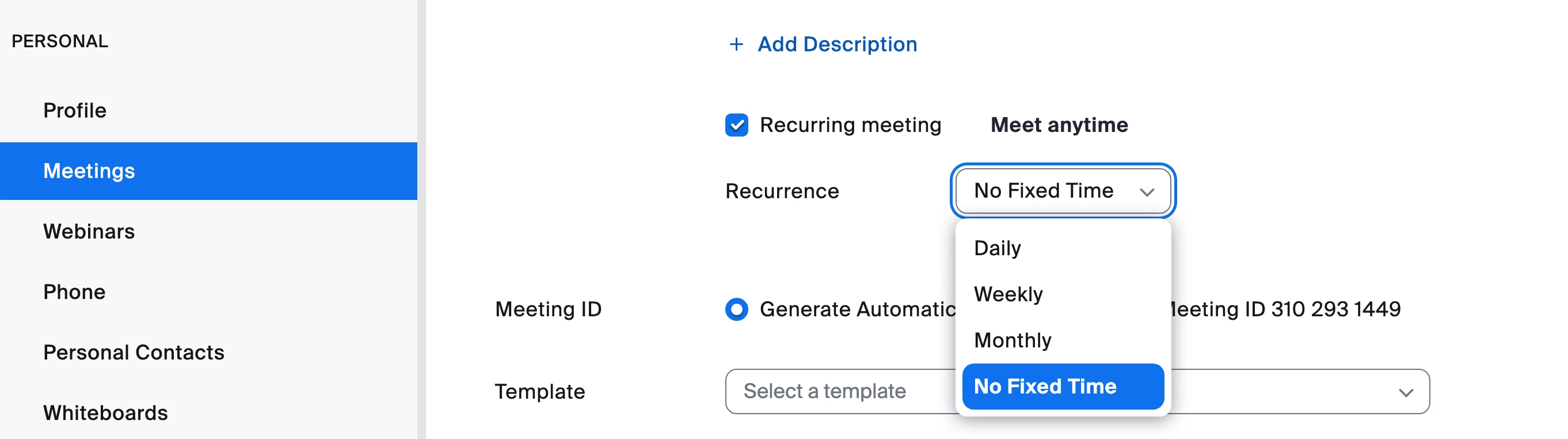
    I am on a Mac and I can find it. Here is a screenshot I just took. Ray is giving you correct information.


    Regards

    16 replies

    Ray_Harwood
    Community Super Champion | Customer
    Community Super Champion | Customer
    December 4, 2022

    Hi, @Sa16,


    This option is available on the web portal as No fixed time:

    This option is not available on the Zoom desktop client. It was removed due to certain performance issues, and may be returned in a future release.


    Newcomer
    April 11, 2023

    Dear Zoom; I absolutely need this option to be available on the desktop client. It was PERFECT until the latest update! Please change it back to what it was. Thank you.

    Newcomer
    April 12, 2023

    I completely agree. I need this functionality on the desktop client.  Please reinstate it.  Thank you.

    Sa16Author
    Newcomer
    December 5, 2022

    Great, thank you!


    Newcomer
    December 8, 2022

     I have the same issue and on my desktop and mobile the option is gone - there is no 'Meet Anytime' and no more 'No Fixed Time' under the drop-down. The only options are 'daily, weekly, monthly' now. It seems that this has become the default. I recently updated my zoom to the latest version, and this seems to have happened as a result. 

    Help needed!

    Newcomer
    April 10, 2023

    I have the same issue as of 4/10/2023. I did not have this issue a few weeks ago. 


    There is not "meet anytime" option when I click "recurring meeting". I have to choose a date, time, number of recurrences, the day of the week each meeting will be etc. 

    Ray_Harwood
    Community Super Champion | Customer
    Community Super Champion | Customer
    April 11, 2023

    Hi, @Summer22173.


    How are you scheduling this meeting?  The option is present on the Zoom Web Portal method of scheduling as “No fixed time”::

    The No fixed time option is not currently available on the Desktop App, there’s no Add meeting functionality on the iPad app, and on iPhone, there is no No fixed time option:


    Ray_Harwood
    Community Super Champion | Customer
    Community Super Champion | Customer
    April 11, 2023

    Just a note to everyone: The ability to schedule recurring meetings was added to the Windows Desktop Client on September 26, 2022 in version 5.12.0 (8964). Prior to that, the only way to schedule recurring meetings appears to be on the Zoom Web Portal. I don’t see any indication of changes to the capability in the Windows Desktop Client since then.

    Newcomer
    April 12, 2023
    This post has been deleted.

    I tried this on a Mac on the Zoom web portal and there's no option for recurring meeting under the schedule meetings settings. 🤔 🤔


    Frank_TBAnswer
    Community Champion | Customer
    April 13, 2023

    Hello,


    I am on a Mac and I can find it. Here is a screenshot I just took. Ray is giving you correct information.


    Regards

    Newcomer
    April 14, 2023
    This post has been deleted.

    I have tried this and while it does have the 'No fixed time' option on the web portal settings, it is not a global setting that affects the functionality of the client software.  When using the installed client, the No fixed time option is missing, and this has definitely only been the case since about a week ago, as others have stated.

    I add my voice to the calls to reinstate the previous functionality.  It seems a very pointless and frustrating change.

    Newcomer
    July 13, 2023

    it's totally rubbish

    Newcomer
    April 19, 2023

    I completely agree. Finding this option for each meeting on the web portal settings is VERY time consuming and NOT a realistic solution to this problem. Maybe if I only scheduled 1 meeting per week... I schedule 35+ meetings per week. Zoom, please change this setting back to the way it was. (I also agree with a prior comment that in addition to commenting here we should all be letting Zoom hear our voices under "help- report a problem").

    Newcomer
    April 19, 2023
    This post has been deleted.

    I tried this option and it did not work for me. I even tried uninstalling and reinstalling Zoom after changing my web portal settings. When I logged back into the desktop client, it told me that my settings had been synced with the web portal settings but it's still not giving me the option to schedule without an end date.

    Newcomer
    April 19, 2023

    Having reported this to Zoom support (opening a ticket), I got a response a day or so later that explained this may have happened inadvertently and should be fixed in the next release.  I didn't do anything or notice any updates, but another few days later when I tried again from the installed client, it worked again like it used to, so I'm happy.  Hope everyone else is okay too!?

    Newcomer
    July 16, 2023

    That's interesting puddleshark, It's July now and I got a response from zoom support (within 24 hours of my complaint-thank you zoom) telling me it's not going to be reinstated and I will have to do via the website rather than the installed client.   So I'm not satisfied with that outcome as it's a pain and I'm curious why it works for some and not others (me!) @zoomsupport


    Newcomer
    July 16, 2023

    Well, what I described happened a few months ago, about one week ago in early July it stopped working again for me too. If that is how it is to stay that is totally out of order, apparently everyone is agreed on that!?  Maybe we should all stage a boycott and use Skype instead for a week.

    Newcomer
    May 9, 2023

    I also agree. This was perfect until it was "fixed". Most of my repeating times are repeating for years. I don't want to have to keep setting up new meetings every couple of months. I hate the way it works now. I may even switch to simple practice to do my videos.