
Cannot Install current version of Zoom in Windows 10 | Community
Skip to main content
Newcomer
April 25, 2026
Question

Cannot Install current version of Zoom in Windows 10

  • April 25, 2026
  • 4 replies
  • 23 views

When I try to install current version of Zoom I get the attached two errors:
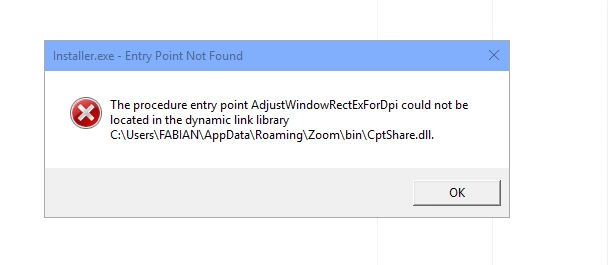
 

1st error


    4 replies

    iambobsat
    Community Champion | Employee
    Community Champion | Employee
    April 26, 2026

    Hi fp3229,

    Thanks for sharing the error screenshot. The error message "The procedure entry point AdjustWindowRectExForDpi could not be located in the dynamic link library CptShare.dll" is a known issue, and here's what's happening:

    The Root Cause:

    The function AdjustWindowRectExForDpi is a Windows API that was introduced in Windows 10 version 1607 (Anniversary Update) and later. This error means your Windows 10 installation is likely running an older build (pre-1607) that doesn't include this API, but the current version of Zoom requires it.

    How to Fix This:

    Step 1: Check your Windows 10 version

    • Press Win + R, type winver, and press Enter.
    • Note the Version number (e.g., 1507, 1607, 1903, 21H2, 22H2, etc.).
    • If your version is below 1607, that's the problem.

    Step 2: Update Windows 10

    • Go to Settings → Update & Security → Windows Update and click Check for updates.
    • Install all available updates and restart your PC.
    • The latest supported version of Windows 10 is 22H2 — ideally, you should be on this version.
    • If Windows Update isn't offering newer versions, you can download the Windows 10 Update Assistant from microsoft.com/software-download/windows10 to force the update.

    Step 3: Clean up the failed Zoom installation, then reinstall

    Before reinstalling Zoom, clear out the leftover files from the failed attempt:

    1. Press Win + R, type %AppData%, and press Enter.
    2. Delete the Zoom folder (located at C:\Users\FABIAN\AppData\Roaming\Zoom).
    3. Also check Control Panel → Programs → Uninstall a program — if Zoom appears there, uninstall it first.
    4. Download the latest Zoom installer from zoom.us/download and run it.

    If you can't update Windows 10:

    If your hardware doesn't support newer Windows 10 builds, you may need to install an older version of Zoom that's compatible with your Windows build. You can contact Zoom Support at support.zoom.us to request a compatible version, though please note that older Zoom versions may lack current features and security updates.

    In summary: Update Windows 10 to the latest build (22H2), clean out the old Zoom files, and reinstall. That should resolve both errors.

    Let us know how it goes!

    fp3229Author
    Newcomer
    April 26, 2026

    The error came in from the latest Zoom installer.

    See my answer to the other response I got.

    I run 1511. But: if you can respond to my other thread here and convince me how what you say could be consistent with what I describe there, fine. 


    Lilly Rowling
    New Member
    New Member
    April 26, 2026

    A lot of Windows 10 users found that the normal .exe installer fails, but the MSI installer from Zoom’s “Download for IT Admin” section works much better, so that might be worth trying too. 🖐🏼

    fp3229Author
    Newcomer
    April 26, 2026

    Thanks.

    Can I use it to install in the same place that the EXE install does?
