Cannot find my local recording | Community
Skip to main content
Newcomer
March 14, 2023
Solved

Cannot find my local recording

  • March 14, 2023
  • 4 replies
  • 21 views

Please Help!!


I was not signed in on my zoom account as I just followed a link and now I cannot find the recording.


I was invited to attend a meeting and was made host so that I could do my presentation. I pressed record and a pop-up said the recording had started. I then selected to have the recording saved to my computer. After the presentation, I ended the recording and again the pop-up came saying that the recording had finished. Shortly after the meeting ended and I left the meet. The original host is asking me for the recording and I cannot find it anywhere.


I desperately need this recording. Please help

    Best answer by ZoomTestKitchen

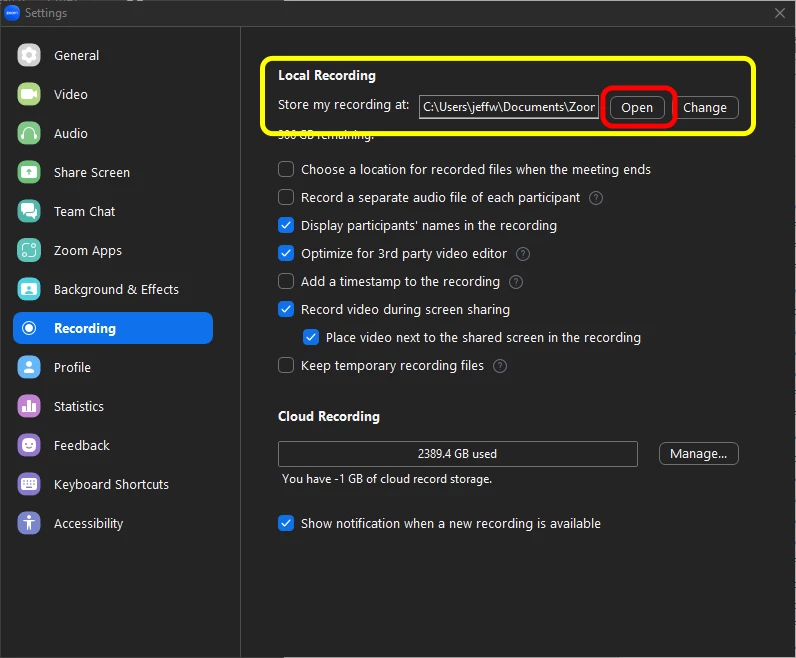
    To locate Local Zoom Recordings...


    1. Open the Zoom Application on your desktop
    2. Go to Settings
    3. In Settings, go to Recording
    4. Click on the OPEN button in the section "Store my recording at: __________"
    5. This will open a file browser to the folder in which Zoom stores local recordings
    6. Find the folder that begins with the date of your meeting and double-click on it


    If you find this information helpful, please click on "Accept as Solution".

    If you have further questions, please reply, we're happy to help.


    4 replies

    ZoomTestKitchen
    Specialist
    Specialist
    March 14, 2023

    To locate Local Zoom Recordings...


    1. Open the Zoom Application on your desktop
    2. Go to Settings
    3. In Settings, go to Recording
    4. Click on the OPEN button in the section "Store my recording at: __________"
    5. This will open a file browser to the folder in which Zoom stores local recordings
    6. Find the folder that begins with the date of your meeting and double-click on it


    If you find this information helpful, please click on "Accept as Solution".

    If you have further questions, please reply, we're happy to help.


    Newcomer
    January 26, 2024

    I am also having trouble finding my local recordings. I recorded 4 videos over an hour long zoom call and only the first recording is showing up. Every troubleshoot I've seen posted still on gives me the first recording. I am not sure what to do... these recording were very important

    Annette5Author
    Newcomer
    March 15, 2023

    Thank you so much!!

    Newcomer
    April 8, 2024

    This is exactly what happened to me Annette5 - exactly and the solution Zoom provided DID NOT WORK.


    This is what message came out.

    Local recordings are listed only for meetings that were recorded while using a supported version of the client. Verify that your client has been upgraded to a supported version before you start the meeting. The supported versions are:

    • Windows: Version 4.0.25513.0228 or later
    • Mac: Version 4.0.25513.0228 or later
    Newcomer
    June 5, 2024

    Exactly the same issue. I was a guest, the host granted me permission to record in three meetings, and now I cannot find the recordings locally. I can find my own test recordings, but not these three.
    My Zoom Workplace version is 6.0.11. Very frustrating as I need to refer to these recordings during the next month quite often.