

cannot add video filters due to it disabled & not an admin | Community
Skip to main content
Newcomer
January 6, 2024
Solved

cannot add video filters due to it disabled & not an admin

  • January 6, 2024
  • 2 replies
  • 6 views

I have a Zoom One Pro account - for some reason, when I try and add a simple video filter, the message comes up saying it is disabled and to go to settings. I've looked but cannot find out why it is disabled. Also, for some reason, even though I am the "owner", I cannot find out why I am not an "admin". From what I've read, only Admin's can access the video filters. I may be mistaken in all this, but your help would be greatly appreciated. Cannot find out where I can make myself an Admin.....

Best answer by bstrelko

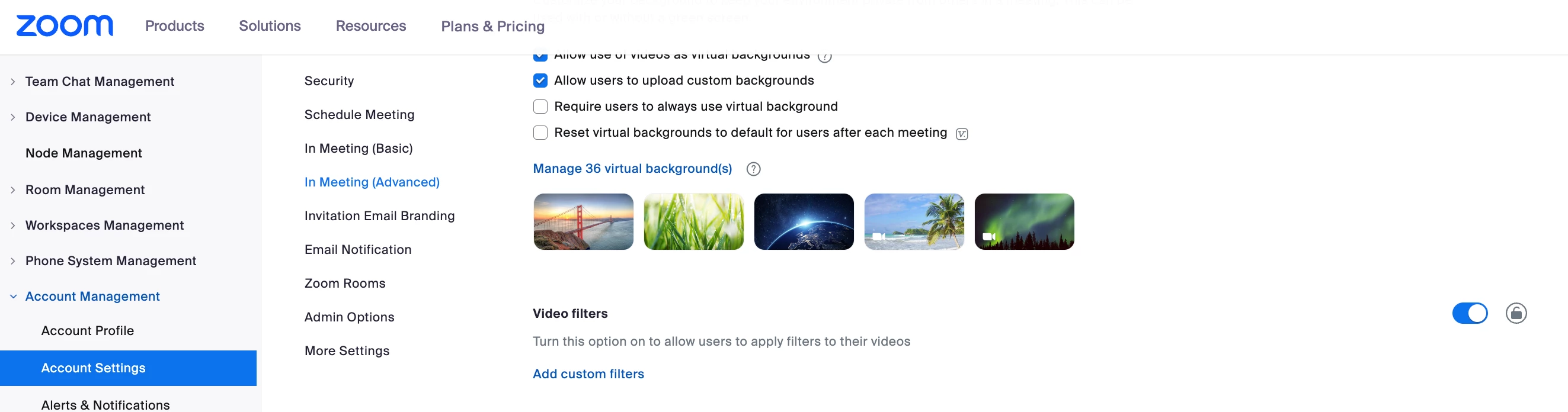
The 'owner' role has full admin access by default - you'll just likely need to enable video filters for the account at zoom.us/account/setting:


Once this has been enabled at the account level, you can check to make sure that it's enabled at the group and user levels, as further restrictions can be set there. Most likely, however, just enabling this for the entire account will do the trick.

2 replies

bstrelko
Community Champion | Customer
bstrelkoAnswer
Community Champion | Customer
January 6, 2024

The 'owner' role has full admin access by default - you'll just likely need to enable video filters for the account at zoom.us/account/setting:


Once this has been enabled at the account level, you can check to make sure that it's enabled at the group and user levels, as further restrictions can be set there. Most likely, however, just enabling this for the entire account will do the trick.

Newcomer
January 6, 2024

So simple! You solved the issue, and for this, I thank you very much !!