Can't sign out of one of my Zoom accounts | Community
Skip to main content
Newcomer
September 2, 2025
Solved

Can't sign out of one of my Zoom accounts

  • September 2, 2025
  • 3 replies
  • 20 views

When I type in "Zoom" in Duck Duck Go. It brings me to one of my zoom accounts and I am already signed into it. Then when I try to sign off it doesn't let me. I stay signed into this account despite signing out of it.

Best answer by aileenfelix

Hi BigBlue - Welcome to the Zoom Community. 


What's likely happening is that DuckDuckGo, might be holding onto a little piece of information—a "cookie"—that tells Zoom you're already logged in. Even when you try to sign out, the browser just keeps handing this cookie back to Zoom, so it feels like you're in a never-ending loop.


I would recommend to clear cache and cookies on your Duck Duck Go browser, close and re-open the browser, and try to see if the issue persists. 


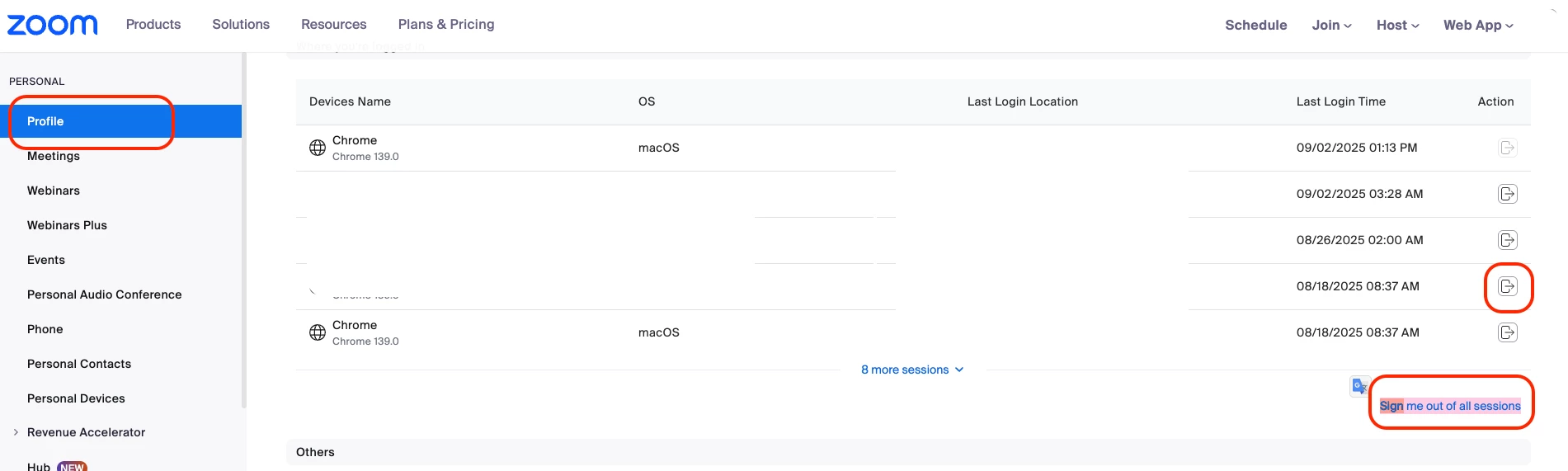
If you're still experiencing the same problem, you can force sign-out the session via the Zoom Web portal (zoom.us). This is the ultimate way to make sure you're starting with a clean slate. On the Zoom Web Portal (zoom.us), go to your Profile page, scroll all the way down to the very bottom of the page, and you should see a button to sign-out per session, or sign you out of all sessions. Please see sample screenshot below. 
 

I hope these recommendations help.  😀

 

3 replies

Employee
September 2, 2025

Hi BigBlue - Welcome to the Zoom Community. 


What's likely happening is that DuckDuckGo, might be holding onto a little piece of information—a "cookie"—that tells Zoom you're already logged in. Even when you try to sign out, the browser just keeps handing this cookie back to Zoom, so it feels like you're in a never-ending loop.


I would recommend to clear cache and cookies on your Duck Duck Go browser, close and re-open the browser, and try to see if the issue persists. 


If you're still experiencing the same problem, you can force sign-out the session via the Zoom Web portal (zoom.us). This is the ultimate way to make sure you're starting with a clean slate. On the Zoom Web Portal (zoom.us), go to your Profile page, scroll all the way down to the very bottom of the page, and you should see a button to sign-out per session, or sign you out of all sessions. Please see sample screenshot below. 


I hope these recommendations help.  😀

 

MGSR
Community Manager
Community Manager
September 10, 2025

Hi @BigBlue!

Did you see the previous response from @aileenfelix?
If it has resolved your inquiry, please press the Accept as Solution.

If you need further assistance, please let us know.

Have a great day!

MGSR
Community Manager
Community Manager
September 17, 2025

Hi @BigBlue!

Given the time elapsed since we last heard from you, I've taken the liberty of marking the provided answer as the solution.

If you need further assistance, please let us know.

Have a fantastic day!