Can't enable avatars or additional virtual backgrounds | Community
Skip to main content
Newcomer
November 18, 2022
Solved

Can't enable avatars or additional virtual backgrounds

  • November 18, 2022
  • 2 replies
  • 4 views

Shalom from Israel! I have a paid Zoom account and in settings under meetings, I have avatars enabled but I don't see a tab when I have a Zoom window open. Nor can I add additional backgrounds, other than the standard 'none' and 'blur'. I'm running Windows 11 64-bit and have a Intel Core i7 9750H cpu

Best answer by YaBoiB

Hello @sschimel


 These settings are controlled in the Zoom Desktop app. In the dock on a mac computer or in the applications area of a Windows computer. Go to search field > type in Zoom > open Zoom application. If you have not yet downloaded the app to your machine, then go to zoom.us/download and download the Zoom Meeting Client (aka Zoom Desktop Application) 
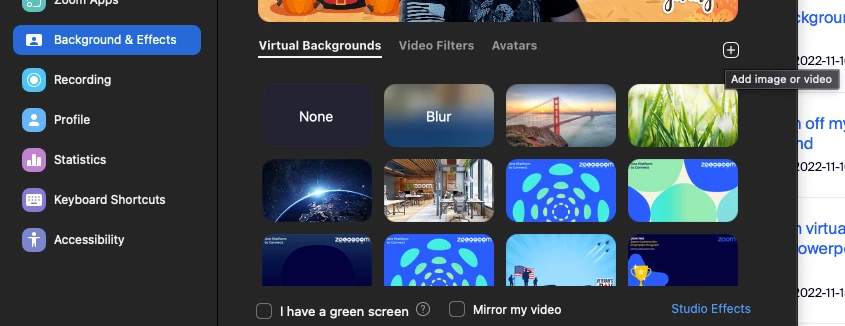
 

 After downloading the app to your machine, go to your profile > settings > backgrounds and filters. 


If you are a member of an organization and not the admin of your account, then there is a probability that your organization can lock these settings and not allow you to change them. Many business and enterprise customers block the ability of their members to change the background or use the filter options. 


Please let me know if this is helpful for you. 


Regards,

Brandon

2 replies

YaBoiB
Community Champion | Employee
YaBoiBAnswer
Community Champion | Employee
November 18, 2022

Hello @sschimel


 These settings are controlled in the Zoom Desktop app. In the dock on a mac computer or in the applications area of a Windows computer. Go to search field > type in Zoom > open Zoom application. If you have not yet downloaded the app to your machine, then go to zoom.us/download and download the Zoom Meeting Client (aka Zoom Desktop Application) 


 After downloading the app to your machine, go to your profile > settings > backgrounds and filters. 


If you are a member of an organization and not the admin of your account, then there is a probability that your organization can lock these settings and not allow you to change them. Many business and enterprise customers block the ability of their members to change the background or use the filter options. 


Please let me know if this is helpful for you. 


Regards,

Brandon

Newcomer
August 25, 2023

 enable my  avatar

Newcomer
August 24, 2023

Hi, I have done all the necessary updating and uninstalling to reinstall and I still do not have the avatar option. my Mac is a newer version as well.
