Blurrred Background | Community
Skip to main content
Newcomer
February 17, 2023
Solved

Blurrred Background

  • February 17, 2023
  • 2 replies
  • 4 views

The background is always slightly blurred, even though the "virtual background" and "blur" functions are turned off. I have tested 5 different cameras. With all of them I have the slightly blurred background.

    Best answer by TomO

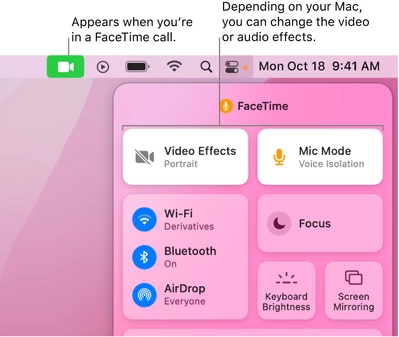
    On the new versions of MacOS, Apple has added a new Video Effects (Change video effects for FaceTime calls on Mac ). Try to turn off the Video Effects mode while using Zoom. The blurred background effect should then be removed.


    If this resolves your issue please mark this reply as an accepted solution.

    2 replies

    TomO
    Community Champion | Employee
    TomOAnswer
    Community Champion | Employee
    February 17, 2023

    On the new versions of MacOS, Apple has added a new Video Effects (Change video effects for FaceTime calls on Mac ). Try to turn off the Video Effects mode while using Zoom. The blurred background effect should then be removed.


    If this resolves your issue please mark this reply as an accepted solution.

    co19Author
    Newcomer
    February 17, 2023

    Thank you, TomO! That solved my problem perfectly!
    A super fast and helpful hint with a perfect description!