Blurred background | Community
Skip to main content
Newcomer
March 22, 2022
Solved

Blurred background

  • March 22, 2022
  • 6 replies
  • 4 views

My iPad Zoom background is blurred even the virtual background is selected “None”.

I’ve tried to log out and also delete & reinstalled the Zoom but the background is still blurred.  

I didn’t change the setting.  Please help !

    Best answer by TomO

    Hello,

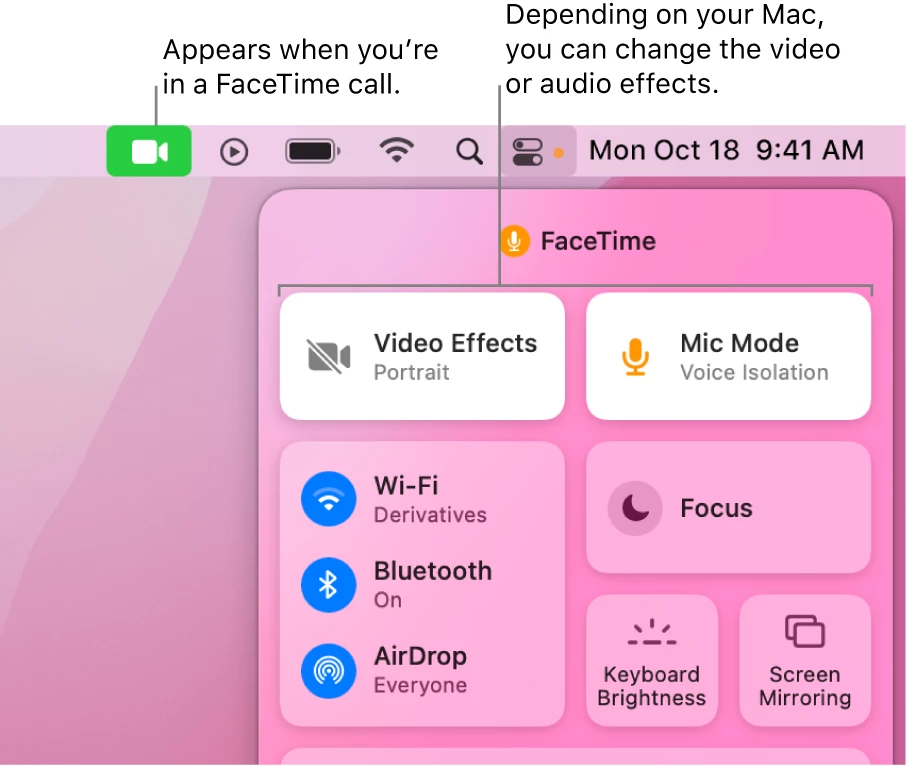
     On the new versions of MacOS, Apple has added a new Video Effects (Change video effects for FaceTime calls on Mac ). Try to turn off the Video Effects mode while using Zoom. The blurred background effect should then be removed.


    If this resolves your issue please mark this reply as an accepted solution.


    6 replies

    TomO
    Community Champion | Employee
    TomOAnswer
    Community Champion | Employee
    March 22, 2022

    Hello,

     On the new versions of MacOS, Apple has added a new Video Effects (Change video effects for FaceTime calls on Mac ). Try to turn off the Video Effects mode while using Zoom. The blurred background effect should then be removed.


    If this resolves your issue please mark this reply as an accepted solution.


    ErikosAuthor
    Newcomer
    March 23, 2022

    Thank you so much TomO! 

    Newcomer
    September 21, 2022

    thankssssssss a lot buddy TomO, you just saved my life man 


    come to India I will show you Tajmahal for free 

    Newcomer
    November 20, 2022

    Thank you so much for this solution.  We have a logi ConferenceCam which was unusable because of this setting; and it is now fixed!!  Thankyou!!

    Newcomer
    April 14, 2023

    Please help - I'm using Zoom on Windows 11 and I still have this issue (constant blurred background).  I do not see anywhere where one can "turn off video effects."  I have my NONE highlighted and selected on virtual background.  Is there somewhere else where I can turn off/disable all video effects?  I find it nowhere.  My background remains blurred and it's annoying because I go in and out of focus during my entire meeting.  Help, thank you!

    Newcomer
    April 26, 2024

    I am have the same problem.   My background is always blurred.

    Newcomer
    April 26, 2024

    I am using a PC (Lenovo laptop).  So the Community Champion's suggestion doesn't work for me.  BUT... I did find a solution, and it's a weird one:  plug in an external video cam and the problem goes away.  WHY??  No idea.  But that was the only fix.  So strange, unexplainable.  Give it a try.  Nothing else worked, and nobody could help me.