

blurred background | Community
Skip to main content
GutGemacht
Newcomer
Newcomer
February 21, 2022
Solved

blurred background
  • February 21, 2022
  • 16 replies
  • 15 views

 Hi!

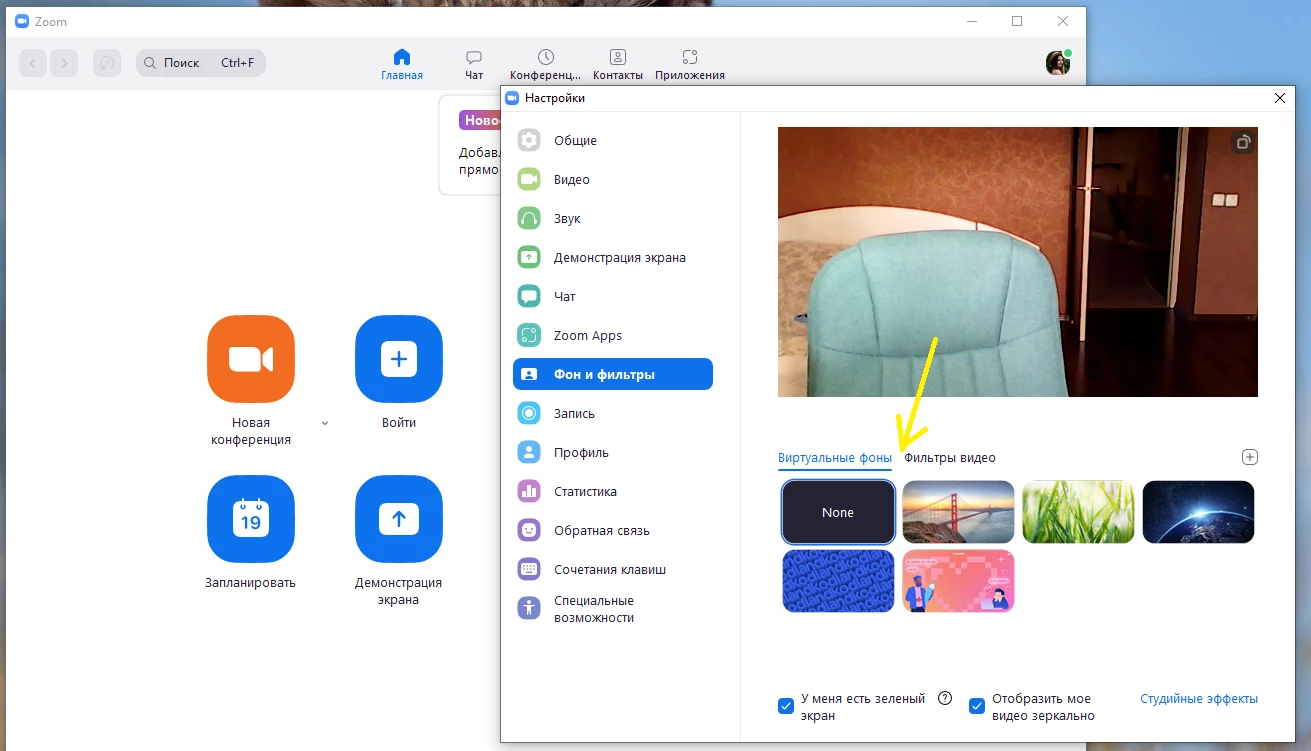
I have the last Zoom desktop client. But there is no blurred background. And I am sure that blurred backgroubd is supported by my computer. Please help how can I fix it?

 

    Best answer by IP-Man

    I see it now, unfortunately the lowest Processor that supports  Blur background for Zoom is Intel i3. From the looks of it, your laptop has Pentium processor which is a processor that does not  meet the Technical requirements in using Blur Background.


    Another thing to note is, Skype Blur has different Technical Requirement on using Blur versus Zoom so we cannot compare the two.


    If this has answered or help find a solution to your question , please click the Accept as Solution button below so that others in the Community may benefit as well.

    16 replies

    Newcomer
    February 14, 2023

    It because of your camera is focus on you that's why your surrounding have become blur.

    FlyDun
    Newcomer
    Newcomer
    June 27, 2023
    The ability to use background blur and background removal depends on your computer's processor. Please check it here: Zoom Virtual Background system requirements. You can use a green screen to accomplish this. Additionally, for the cleanest results, use a solid color in the background.
     
    Need stunning Zoom backgrounds? Show off your personality and interests during Zoom meetings. FineShare allows you to create unique, fun, and creative backgrounds in seconds—powered 100% by AI. You can find it here: Zoom Background.
    Newcomer
    August 17, 2023

    Im having the same issue and have intel 1.3. I want the bkurred background but its not an option and same as your picture above. Whats really weird is whether I use the bridge or grass my home background is super imposed over the grass. Can anyone help with this?


    Newcomer
    December 21, 2023

    I had the same problem on my new computer.  No option for blur was there. I was using microsoft.  When I switched to Google Chrome, the blur option appeared.  It worked for me, give it a try.

    Newcomer
    May 1, 2024

    Thanks, confirming that using the web version with Chrome browser allowed me to blur my background. I'm on Windows 10 Pro with an i5-2400 processor, which doesn't support blurred background via the desktop client.

    Newcomer
    June 14, 2024

    Have you signed up/login in,

    in the app..

    Newcomer
    August 12, 2024

    I meet al the system requirements, but I get a message: "error occurred" when activating Blur in desktop mode in Chrome.. in the desktop app, there isn't even a blur option under virtual backgrounds..  so how on earth does one fix this?

    Newcomer
    October 3, 2024

    Does this qualify for blur background use?


    Device name DESKTOP-ROGAAKS
    Processor Intel(R) Core(TM) i5-7300U CPU @ 2.60GHz 2.70 GHz
    Installed RAM 8.00 GB (7.88 GB usable)
    Device ID 77D64892-08F3-4FFA-B658-26444149B7A7
    Product ID 00330-50653-38599-AAOEM
    System type 64-bit operating system, x64-based processor
    Pen and touch No pen or touch input is available for this display