background is always blurred | Community
Skip to main content
Newcomer
February 17, 2023
Solved

background is always blurred

  • February 17, 2023
  • 16 replies
  • 29 views

I am using Mac OS 13.2 and recently my Zoom background is always blurred unless I have a photo for my virtual background.  I have tested with multiple cameras (built-in, iPhone, NexiGo) and all show this behavior in Zoom.  It does not occur in other apps such as FaceTime or Photo Booth.  It is not quite as blurred as the "Blur" option in the "Background & Effects" but clearly out of focus.


I notice this only on my MacBook Pro and not my iPhone.

This is fairly recent behavior and I cannot find any setting in either the desktop or web client that corrects it.

Has anyone seen this behavior or know how to correct it?

    Best answer by TomO

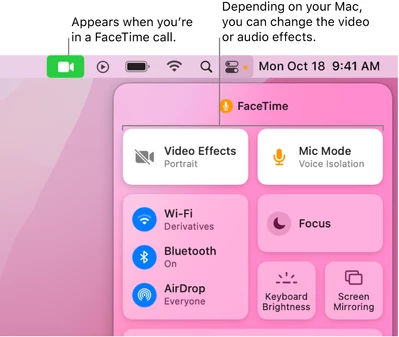
    On the new versions of MacOS, Apple has added a new Video Effects (Change video effects for FaceTime calls on Mac ). Try to turn off the Video Effects mode while using Zoom. The blurred background effect should then be removed.


    If this resolves your issue please mark this reply as an accepted solution.

    16 replies

    Newcomer
    September 11, 2024

    Click on the green camera at the top of your screen when you are in zoom. Turn off the portrait mode.

    This will fix the problem.

    Newcomer
    December 9, 2024

    That problem ate a whole morning.  Can't thank you enough.  Apparently the Facetime settings are, in some sense, global

    Newcomer
    January 8, 2025

    This is the top result in google for this issue, so I'm copy-and-pasting an answer I wrote for another thread here. 


    There are now (at least) three settings to check if you have a blurred background:

    1. Is the "blur" filter turned on in the Zoom settings? (under "Background & effects". I have seen a report that you may have to go into the advanced meeting settings in the zoom website to turn on "virtual backgrounds" if you don't see this option in the zoom app settings.)
    2. Is your computer / phone / camera applying a blur / "portrait" / shallow depth-of-field filter? For me, using macOS 14.7.2, when I open an app that uses the filter a green camera icon appears in the top bar. Clicking that opens a menu with a "Portrait" option which will apply a blur when selected. Other devices and operating systems may have similar settings
    3. Zoom's own "Portrait lighting" option. This is also (currently, zoom version 6.3.5, 2025/1/8) under "Background & effects". It is a checkbox option directly above the Virtual Background selector, in a checkbox group with four other options like "Mirror my video". I would upload a screenshot but I do not yet have permissions here, sorry.


    #3 was the issue for me and wasn't mentioned in any of the top google results I checked. There is one comment in this thread mentioning it already, but I thought it might be helpful to be more explicit about where the option is located

    Newcomer
    January 30, 2025

    number 3 did it for me. 

    Newcomer
    January 13, 2025

    I'm having the same problem.  When I purchased a new computer a few months ago (windows 11) I installed zoom and experimented with the background effects.  Now, I can't make blur stop.  I have turned on None in both filter and background effects and set it to apply to all meetings.  I have also deleted cookies and cached images.  I have uninstalled and reinstalled zoom.  I don't use facetime. I have tried turning on and off "Mirror my video".  Any suggestions?

    Newcomer
    February 12, 2025

    I just struggled with this on my MacBook Pro -- I was getting a blurred background on both Zoom and Google Meet.


    I finally solved it this way: Instead of running Zoom and then clicking the video camera icon, turn Zoom OFF and then open the actual FaceTime app on your MacBook. Now click the camera icon and look for *portrait mode,* which sharpens your face but blurs the background. Turn portrait mode off and the background should come back into focus.


    In my case, portrait mode had been set to ON with FaceTime, even though I'd tried to turn it off during Zoom / Meet calls. So it seems like maybe the FaceTime setting overrides the other apps somehow, by design or just by glitch. Anyway, this worked for me.

    Newcomer
    June 6, 2025

    Thank you thank you 🙂 this was amazing - I realized I was able to set it and then forgot about and I was reinstalling zoom again and again without solution, thank you so much.