
Background has disappeared | Community
Skip to main content
Degodier
Newcomer
Newcomer
July 14, 2023
Solved

Background has disappeared

  • July 14, 2023
  • 1 reply
  • 14 views

Hello all. 


I have seen various posts about this but none which fit exactly, so I would be really grateful for a fix. I have Zoom One Pro (paid) used on desktop PCs. We also have it on our mobiles, although meetings are always on the PCs. I have backgrounds enabled but when the other member of staff (small business, just two of us using Zoom) opens a prearranged meeting the background is not there. I have tried signing out and signing back in again. I have seen a post from back in March which suggests I should uninstall & reinstall Zoom. Excuse me for being non-techy but does this mean we both have to do that or just me? I'm the account holder. 


Many thanks indeed from Antonia in cool & rainy Surrey, UK.

Best answer by AaronO

Hi Degodier,

Sometimes when Zoom updates, it can turn of virtual backgrounds. Can you check your settings to see if it's currently on? If you start a meeting right now, does it apply your background automatically? Or is it only when you join the prearranged meeting does your background not show up? 

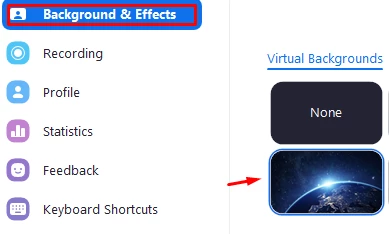
On the Zoom desktop app, select the gear icon under your profile image and then choose Background & Effects

Do one of the options show a blue outline meaning it's selected? 


1 reply

AaronOAnswer
Newcomer
July 14, 2023

Hi Degodier,

Sometimes when Zoom updates, it can turn of virtual backgrounds. Can you check your settings to see if it's currently on? If you start a meeting right now, does it apply your background automatically? Or is it only when you join the prearranged meeting does your background not show up? 

On the Zoom desktop app, select the gear icon under your profile image and then choose Background & Effects

Do one of the options show a blue outline meaning it's selected? 


Degodier
Newcomer
DegodierAuthor
Newcomer
July 14, 2023

Thank you AaronO I'm grateful. In the end it transpired that my colleague was not signing into Zoom before starting the meeting but just clicking the link from the email invitation. As soon as he signed in first the background appeared (of course).  I've given him a good beating (not really) and he's promised to bring a lot of cake into the office by way of apology. Kind regards

Newcomer
July 14, 2023

Glad to hear it's working now!