

Background Blurring even without filters enabled | Community
Skip to main content
Newcomer
January 14, 2025
Solved

Background Blurring even without filters enabled

  • January 14, 2025
  • 4 replies
  • 55 views

Hello, Since my last update, my background has been blurred on my MacBook Air (Ventura 13.6.9). I am using Zoom workplace version 6.3.5, but I have had this issue on the previous Zoom update as well. No virtual backgrounds are enabled or any other effects. I do not have this issue with Zoom work place on my i phone or my i pad. I have read the threads about the Face Time camera settings being the issue, but it works fine on my phone and I pad, so I assume this isn't the issue....
Best answer by Frank_TB

Hello,

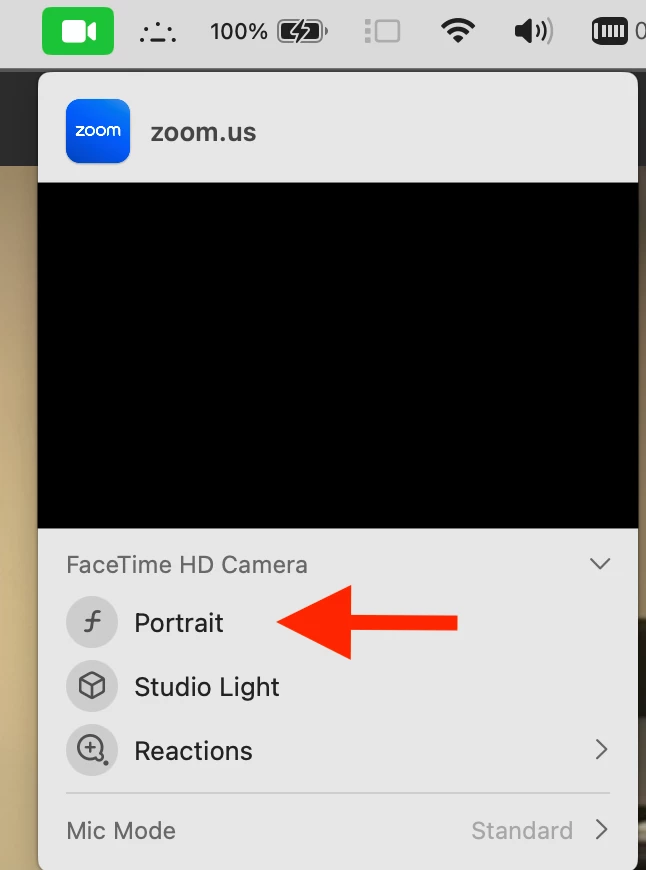
Turn off the "Portrait" setting in the green Facetime icon when in a Zoom call. it definitely blurs your background on your Mac.


https://support.apple.com/en-ca/guide/facetime/fctm81f99179/5.0/mac/14.0 


Regards

If my reply helped, don't forget to click the accept as solution button!

4 replies

Frank_TBAnswer
Community Champion | Customer
January 15, 2025

Hello,

Turn off the "Portrait" setting in the green Facetime icon when in a Zoom call. it definitely blurs your background on your Mac.


https://support.apple.com/en-ca/guide/facetime/fctm81f99179/5.0/mac/14.0 


Regards

If my reply helped, don't forget to click the accept as solution button!

pzillaAuthor
Newcomer
January 16, 2025

Thank you! Unfortunately, that green camera icon does not exist in the most recent Zoom updates, so I was unable to follow any threads with this advice. If people are looking for the portrait mode setting  on Macs running newer versions of Zoom, it’s in the control panel icon in the Mac menu bar in the top right hand corner, to the left of the date

Newcomer
January 15, 2025

I'm having what might be the same issue on my Windows laptop. I have no blurring or filters applied, but Zoom seems to treat my real background as if it was a virtual one: there are those artifacts around the foreground image  when moved (head and shoulders) that you get when the background is being filled in by software. And the image generally looks washed out.

pzillaAuthor
Newcomer
January 16, 2025
This post has been deleted.

Thank you, as you’ll note  in my post above, there are virtual background or filters enabled.

MGSR
Community Manager
Community Manager
January 23, 2025

Hello there,

Welcome to the Zoom Community! We're glad to have you here.

If the blur option is disabled in the background settings and the background is still blurred, your device may have a built-in video effect that automatically applies a virtual background or blur during Zoom meetings. To disable this feature, please refer to your device's manual or settings for instructions. This will help ensure your background appears as intended during the meeting.

If you need further assistance, please let us know.

Newcomer
February 6, 2025

I have just joined Zoom and it has blurred my background, despite showing that the background is turned off.  It also has created the same issue for MS Team and Webex - I did not have this issue before and in my laptop settings it does not show any background being used but it shows a blurred background?!