
Avatar not working | Community
Skip to main content
Newcomer
April 8, 2022
Question

Avatar not working

  • April 8, 2022
  • 6 replies
  • 3 views

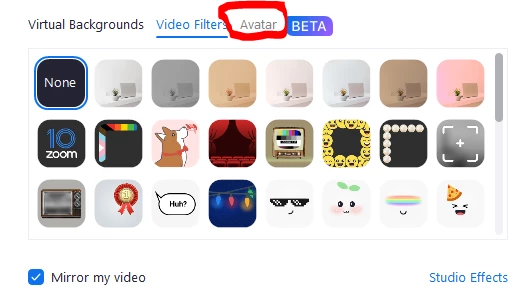
I just updated my Zoom, but it won't let me click on the avatar, I don't know why, any ideas how to fix this.



    6 replies

    Alex_PFT
    Partner
    Partner
    April 8, 2022

    Hi,

    You can check if they are enabled:


    To enable or disable Avatars for your own use:

    1. Sign in to the Zoom web portal.
    2. In the navigation panel, click Settings.
    3. Click the Meeting tab.
    4. Under In Meeting (Advanced), click the Avatars toggle to enable or disable it.
    5. If a verification dialog displays, click Enable or Disable to verify the change.
      Note: If the option is grayed out, it has been locked at either the group or account level. You need to contact your Zoom admin.


    Using Avatars in meetings and webinars – Zoom Support


    Alex

    zoom@pft

    Desandu7000
    Explorer
    Explorer
    April 10, 2022

    How to unlock, if it's grayed out...?😕😕

    Newcomer
    May 22, 2022

    yep..... how? i tried signing in but didnt work.

    Pumal_W
    Newcomer
    Newcomer
    April 11, 2022

    Same to me..are you fixed this issue?

    Desandu7000
    Explorer
    Explorer
    April 11, 2022

    Not Yet...!😕😕

    Alex_PFT
    Partner
    Partner
    April 11, 2022

    HI,

    Point #5 of my post is answering your question.


    5. If a verification dialog displays, click Enable or Disable to verify the change.
    Note: If the option is grayed out, it has been locked at either the group or account level. You need to contact your Zoom admin.


    If it's grayed out, it has been locked by the owner or admin of your account. You need to contact them.


    If your the owner, check this link for the procedure:

    Using Avatars in meetings and webinars – Zoom Support


    Alex

    zoom@pft

    Newcomer
    April 25, 2022

    where do you enabel filters


    Alex_PFT
    Partner
    Partner
    April 28, 2022

    Hi,

    it's enabled by default, if not, on the web portal in settings:


    Alex

    zoom@pft

    Newcomer
    May 11, 2022

     When I see the live lecture in evil nun outwitt mod apk hack so i update the zoom and am facing the same issue but i select the avatar . Don't worry its not a big issue.

    Newcomer
    October 28, 2022

    same problem avatars not workeing 


    Newcomer
    December 10, 2022

    Avatars are not working for me and I have no Avatar option in settings.

    Newcomer
    May 8, 2023

    did you find it, I"ve even searched setting but 'avatar" is nowhere to be seen