

auto record only to local PC | Community
Skip to main content
Newcomer
February 9, 2024
Solved

auto record only to local PC

  • February 9, 2024
  • 3 replies
  • 5 views

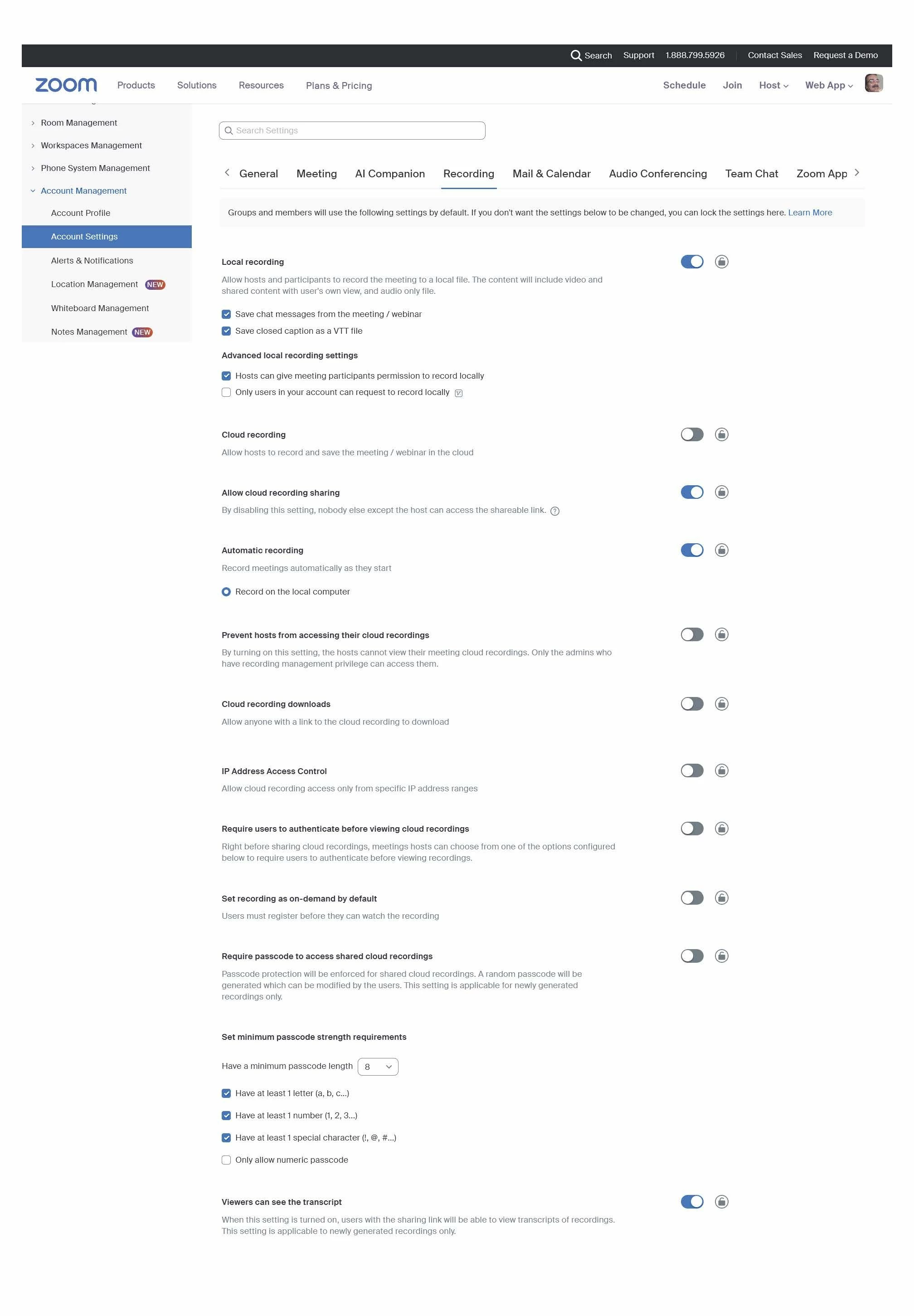
I am trying to set up auto record to local computer and, although the recording starts with the meeting automatically, it records to the cloud.  I have check the forums and docs and believe I have the recording settings  set up correctly.  I have attached a screen shot of my settings.


Please advise, I need to record automatically and ONLY to the local computer.


Thank you 
Best answer by storyhub

Now switch to the recording tab and turn off cloud recording.

3 replies

Community Super Champion | Partner
February 10, 2024

hi drjulian,


i could not read your screen shot, but please take a look at what i found.


Automatic cloud recording will start whether the host joins by computer, mobile device or telephone dial-in. Automatic cloud recording will also start if Allow participants to join anytime is used and participants join before the host.


Automatic local recording will only start when the host starts the meeting from the Zoom desktop client.

Enabling automatic recording - Zoom Support


Did my response answer your question? If so, please don't forget to mark the reply as an accepted solution.


thanks,  eliot


drjulianAuthor
Newcomer
February 11, 2024

Thank you for your reply Eliot.

The automatic recording DOES start when the host starts the meeting, the problem is that the recording goes to the cloud even though I have cloud recording disabled and record to local computer checked on.


I need it to automatically record locally only.


(Unfortunately the forum will not accept an jpg or pdf attachment or I would send a better copy of my settings)

Community Super Champion | Partner
February 11, 2024

hi drjulian,


please make sure that 'allow particapants to join before host' is NOT enabled.


thanks,  eliot

drjulianAuthor
Newcomer
February 11, 2024

Eliot, That setting is NOT enabled.

storyhub
Community Super Champion | Customer
February 11, 2024

What you are showing is the settings at the admin level. Check the profile settings (https://us02web.zoom.us/profile/setting)

drjulianAuthor
Newcomer
February 11, 2024

Thank you for your replay storyhub,


Here are my settings (file attachments not working for some reason so I have provided a link to the pdf)


https://drive.google.com/file/d/1-AKgIAqVgIfaFEiwRF89i0oQfX1dkemD/view?usp=sharing

storyhub
Community Super Champion | Customer
storyhubAnswer
Community Super Champion | Customer
February 11, 2024

Now switch to the recording tab and turn off cloud recording.
