

Audio test not passing | Community
Skip to main content
Newcomer
November 23, 2023
Solved

Audio test not passing

  • November 23, 2023
  • 2 replies
  • 4 views

I am using an Acer 3.  Windows 11.
I had no problems with Zoom, until last week.
When I do the audio test (with my headset, or the laptop speakers) I can hear no sound.

The microphone test passes with laptop mic and headset mic.
The funny thing is, the last two zoom meetings I was on, I could hear the participants and vice versa, despite the weird audio test problems.
What is going on?
Best answer by KaneZhu

Some software and drivers will run their own audio processing for the meeting when they detect that Zoom is running, and then they filter out music, ringtones, notifications, and other sounds they consider as "noise".


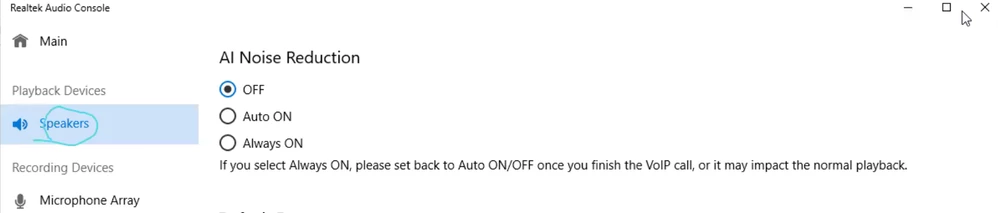
If "Realtek Audio Console" can be found in your App list, please try disabling “AI Noise Reduction” / “Noise Cancellation (voice call)” for speakers. This solved the same issue for many other users.

You can also try disabling other similar audio control software.


2 replies

KaneZhuAnswer
Employee
November 23, 2023

Some software and drivers will run their own audio processing for the meeting when they detect that Zoom is running, and then they filter out music, ringtones, notifications, and other sounds they consider as "noise".


If "Realtek Audio Console" can be found in your App list, please try disabling “AI Noise Reduction” / “Noise Cancellation (voice call)” for speakers. This solved the same issue for many other users.

You can also try disabling other similar audio control software.


Newcomer
January 8, 2025

This worked for me. Same problem, on the same manufacturer of laptop (Acer). Disabled the AI noise reduction in Realtek Audio Console. Now my audio test is working. Thank you!!

Newcomer
November 27, 2023

I am having same problem, did this help fix the issue? my still not fixed.