audio problems | Community
Skip to main content
Newcomer
October 13, 2021
Solved

audio problems

  • October 13, 2021
  • 4 replies
  • 4 views

Is there some listing of compatible sound cards for zoom? I am troubleshooting a problem with an ASI 5720 sound card that has problems only with zoom, but works perfectly with every other piece of software on the PC. An HP, win10.

Zoom received audio sounds fine but outgoing audio sounds bad, even though it doesn't sound bad at all on other software on the machine at the same time. Recording on adobe audition sounds fine but far end audio on zoom is broken up.

Thanks.

    Best answer by Rupert

    Hi @Wa2png 


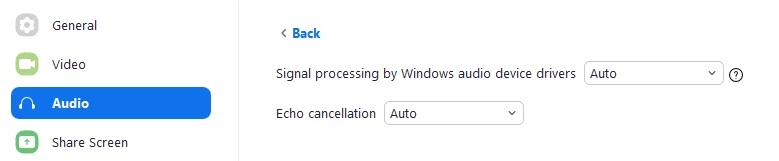
    Also, on Windows, in Zoom, you can try the different Signal Processing methods - in Zoom > Settings > Audio > Advanced Button > Signal Processing. 


    You can try Raw, Default, or Auto.


    Do make sure you are using Original Audio and Stereo Audio and High Fidelity music mode though, like @Jonathan_H says.


    Make sure to enable these features in Settings and THEN enable Original Audio in your Meeting (top left).


    If you are using a Multi-Channel Professional Audio Interface, and you are sending in audio beyond the first two channels, also be aware that Zoom can sometimes sum all channels together - which may not always produce expected results! But that is an edge case.


    I'd also suggest ensuring you are on the 64-but version of Zoom, to the latest version:


    https://zoom.us/client/5.8.1.1435/ZoomInstaller.exe?archType=x64


    4 replies

    Employee
    October 13, 2021

    Curious, what kind of microphone is it?
    Have you tried toggling the audio settings for "Music & Professional Audio"? 

    Wa2pngAuthor
    Newcomer
    October 13, 2021

    Using a pro sound card fed from a broadcast console. I was unaware of the "Music and Professional audio"! Where is it?

    Wa2pngAuthor
    Newcomer
    October 14, 2021

    I don't see any check box for high quality music mode. Just ;

    suppress persistant background noise

    suppress intermittant background nois

    echo cancellation

    I have tried toggling all these options and made no difference.

    Employee
    October 14, 2021

    @Wa2png  - check out Ruperts post below. To my knowledge your description seems to be an older layout of where this option is.  
    Make sure you're updated on the latest version, whether it's Windows or Mac. If you're using a managed computer, Windows or Mac you'll need to get administrative rights to upgrade the client. For self updating, try going to the zoom's file menu and "check for updates". 


    Rupert
    Community Champion | Customer
    RupertAnswer
    Community Champion | Customer
    October 13, 2021

    Hi @Wa2png 


    Also, on Windows, in Zoom, you can try the different Signal Processing methods - in Zoom > Settings > Audio > Advanced Button > Signal Processing. 


    You can try Raw, Default, or Auto.


    Do make sure you are using Original Audio and Stereo Audio and High Fidelity music mode though, like @Jonathan_H says.


    Make sure to enable these features in Settings and THEN enable Original Audio in your Meeting (top left).


    If you are using a Multi-Channel Professional Audio Interface, and you are sending in audio beyond the first two channels, also be aware that Zoom can sometimes sum all channels together - which may not always produce expected results! But that is an edge case.


    I'd also suggest ensuring you are on the 64-but version of Zoom, to the latest version:


    https://zoom.us/client/5.8.1.1435/ZoomInstaller.exe?archType=x64


    Employee
    October 14, 2021

    Great points @Rupert, thanks for sharing!