Audio issues | Community
Skip to main content
Newcomer
August 17, 2021
Solved

Audio issues

  • August 17, 2021
  • 7 replies
  • 5 views

My microphone work fine on other apps however on zoom it shows that theres no input audio and doesnt recognize my input decive. It was working fine for a year but i just uodated my zoom and it stopped working

    Best answer by rn-zm

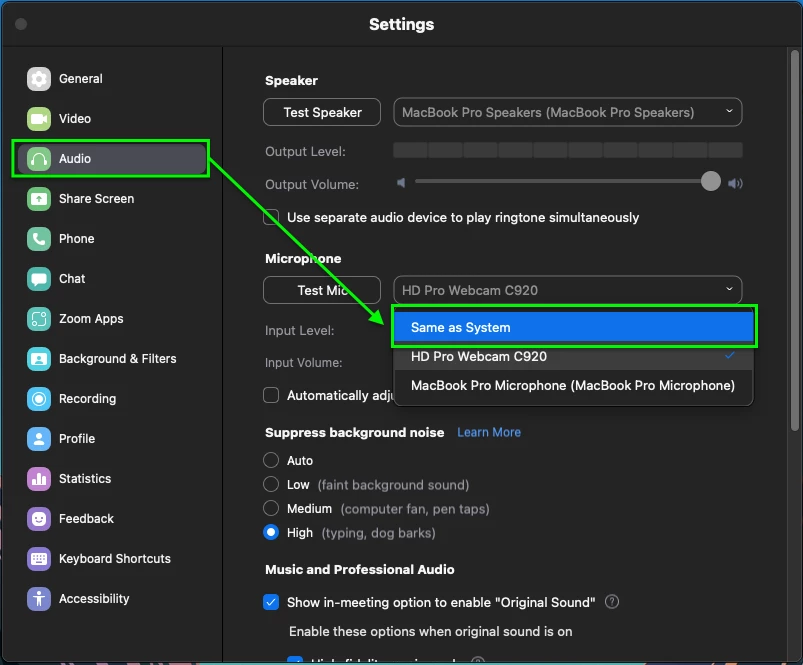
    Hey @Kiho, within your Zoom Desktop Client Audio settings, try setting both your speaker and microphone to 'same as system'. 


    If you do not have this option ensure that you've given permissions Microphone permissions to Zoom (if on macOS), you can look into this KB article, Using the Zoom client and Zoom Rooms with macOS


    If on windows, you can look into your privacy settings if you haven't already or if this was changed:

    1. Open the Settings app and go to Privacy
    2. Scroll down to App permission, select Microphone
    3. Go to Allow desktop apps to access your microphone

    I hope this information is useful!

    7 replies

    rn-zmAnswer
    Community Manager
    August 18, 2021

    Hey @Kiho, within your Zoom Desktop Client Audio settings, try setting both your speaker and microphone to 'same as system'. 


    If you do not have this option ensure that you've given permissions Microphone permissions to Zoom (if on macOS), you can look into this KB article, Using the Zoom client and Zoom Rooms with macOS


    If on windows, you can look into your privacy settings if you haven't already or if this was changed:

    1. Open the Settings app and go to Privacy
    2. Scroll down to App permission, select Microphone
    3. Go to Allow desktop apps to access your microphone

    I hope this information is useful!

    KihoAuthor
    Newcomer
    August 18, 2021

    im not sure why but i tried everything and it doesnt work for only zoom but it works for every other app. ive tried to use another pair of headphones however when i use those i can hear others and speak but sounds from other apps dont come through at all

    Newcomer
    June 15, 2023

    I just recently had the same problem and have tried all of the suggested fixes but no success.


    Newcomer
    August 20, 2021

    That's happening for iPad devices as well, it's something with the new update. 

    Newcomer
    August 25, 2021

    I have the same problem, new laptop therefore new app, Teams works but not Zoom. have tried everything for hours!


    Newcomer
    November 5, 2021

    My audio works in everything except zoom. I tried setting the audio and mike to the system settings but it did not correct the problem. I have been using zoom for over a year and I have not had a problem until today.  I would appreciate any  help

    Community Manager
    November 5, 2021

    Hey @Kiho @glo1 @ErickT, I would try to uninstall Zoom https://support.zoom.us/hc/en-us/articles/201362983-How-to-uninstall-Zoom and reinstalling from zoom.us/download.


    I would also double-check if you have any available operating system updates if so, I'd advise you to update as well! 


    You can also double-check any audio drivers or uninstall/reinstall any audio drivers and any permissions that maybe not grant access to use your microphone or speaker on Zoom. 

    Community Manager
    November 5, 2021

    @ErickT for your iPad situation I would uninstall/reinstall from the App store and ensure the Bluetooth device is compatible. For example, I am able to use my AirPods with my iPhone, and depending on the manufacturer I'd check with the compatibility of your input device. 

    Newcomer
    January 19, 2022

     I`ve the same problem 

    Tried everything from un- and reinstall to driver update for my microphone but nothing helps


    So has somebody an idea for me? I need zoom for my study so its a really bad situation

    Newcomer
    February 9, 2022

    I also have tried all the above solutions and nothing works - but it's just on one computer (ASUS Vivobook). My Lenovo laptop is fine - they're both about 6 months old, running Windows 10.


    Community Manager
    February 9, 2022

    Hi @e168_2 and @JillyPossum mind sending over a screenshot of the available inputs? Couple more questions, but is the microphone you use defaulted within the Windows settings as well? Have you given it access to Zoom? When testing your microphone, are there any levels of input coming through?


    Check some of those areas I questioned above and let me know if you were able to find anything? You could also try to uninstall/uninstall Zoom, Update Windows, or uninstall Zoom -> rebooting -> reinstalling Zoom. 

    Newcomer
    March 5, 2022

    thanks this doesn´t work for me

    Newcomer
    May 28, 2023

    Guys if it still doesn't work, on the bottom left of ur screen click "Open Volume Mixer" The zoom volume might be off, you just click on the mic icon and adjust the volume and it will work.