Audio Echo | Community
Skip to main content
Newcomer
August 14, 2021
Solved

Audio Echo

  • August 14, 2021
  • 2 replies
  • 3 views

Hello,


I am on a laptop when using Zoom.   Both my laptop mic and my external mic when I record .. after when viewing gives my audio an echo sound.   Unsure what to do to fix this.   Any help greatly appreciated.

    Best answer by rn-zm

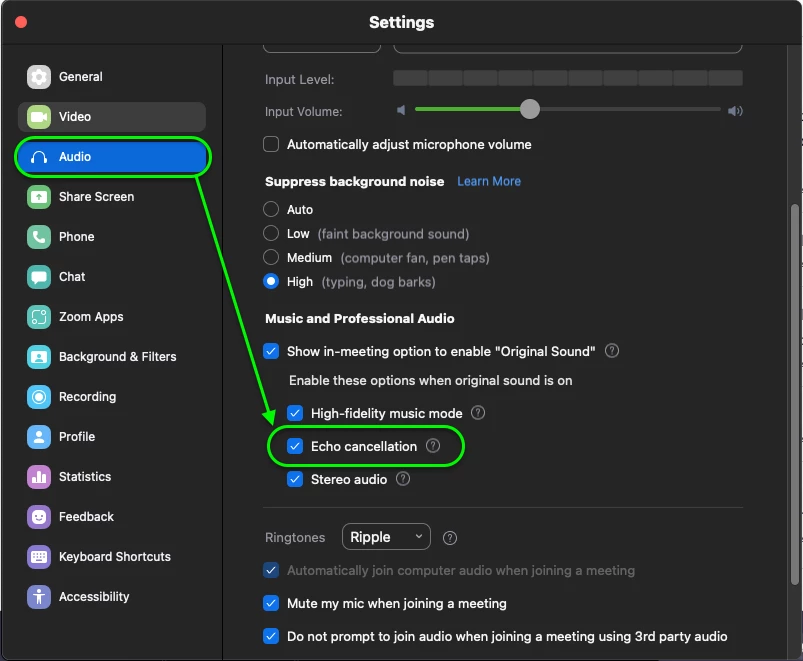
    Hey @amond  try enabling 'Echo Cancellation' within the Zoom desktop client settings.


    You could also try copying my audio settings to see if that helps! My internal and external microphones do not produce any echo. Alternatively, try reducing the volume of your speakers or microphone input. Hope this helps! 

    2 replies

    rn-zmAnswer
    Community Manager
    August 18, 2021

    Hey @amond  try enabling 'Echo Cancellation' within the Zoom desktop client settings.


    You could also try copying my audio settings to see if that helps! My internal and external microphones do not produce any echo. Alternatively, try reducing the volume of your speakers or microphone input. Hope this helps! 

    amondAuthor
    Newcomer
    October 6, 2021

    already have it like that.