


Attendee Freeze Video during One-on-One Meetings | Community
Skip to main content
Sridley
Newcomer
Newcomer
August 13, 2021
Solved

Attendee Freeze Video during One-on-One Meetings

  • August 13, 2021
  • 2 replies
  • 1 view

This issue just started two weeks ago. When I am in a one-on-one Zoom meeting, regardless of who initiates it, the other attendee's screen freezes. If either of us share our screens, it no longer freezes. When we stop sharing, the freezing occurs again. If they stop showing their video for a moment and show their video again, they will unfreeze for few seconds. Then they will freeze again. Because I host several meetings, this is a problem. Based on Zoom's suggestions from our chats, I uninstalled Zoom, reinstalled it to the 64 bit program, and tried it on a LAN line. They are not sure what my problem is, but I need to rectify this problem. This is not a connectivity issue because it happens with everyone I meet with and has only been doing this since the beginning of the month. I even got a stronger modem. Please help
    Best answer by hjams247

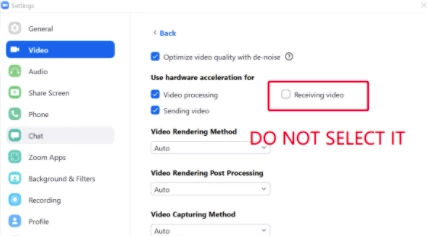
    Hi there! Could you try adjusting the video settings in Zoom Client->Settings->Video->Advanced -> Uncheck Receiving Video in the section (Use hardware acceleration for)


    2 replies

    hjams247Answer
    Employee
    August 13, 2021

    Hi there! Could you try adjusting the video settings in Zoom Client->Settings->Video->Advanced -> Uncheck Receiving Video in the section (Use hardware acceleration for)


    Sridley
    Newcomer
    SridleyAuthor
    Newcomer
    August 13, 2021

    Thank you. I just did what you suggested. I will try to find someone to test it on. Oh, thank you!

    Newcomer
    August 14, 2021

    Same problem, started last week. It is an issue on my laptop (HP Envy) but not my ipad. It was an issue while hotspotting too so ruling out my internet. 

    Sridley
    Newcomer
    SridleyAuthor
    Newcomer
    August 15, 2021

    The solution worked for me. It was actually an issue with my desktop, not Zoom. Look at zoomhs247's response above. Worked like a charm.  I am so happy. This was such a problem for me.

    Observer