Alternative Host Option Missing from Desktop Client? | Community
Skip to main content
Newcomer
April 2, 2025
Solved

Alternative Host Option Missing from Desktop Client?

  • April 2, 2025
  • 2 replies
  • 22 views

In trying to schedule group meetings recently I have noticed that the alternative hosts feature, which I rely on heavily, is suddenly missing from the desktop client. Is this a known issue? Will this be added back? It's annoying to have to go to the web interface in order to schedule my meetings.

Best answer by PK76_2

Hey @RLGJenna ! You should still be able to add alternative hosts to your meeting when scheduling it on the Zoom desktop app. 

Can you confirm what you see when you're scheduling on the desktop app? And what version of the app you're on? There have been some UI changes lately so it might be in a different spot than you're used to.


Do either of these match what you see?

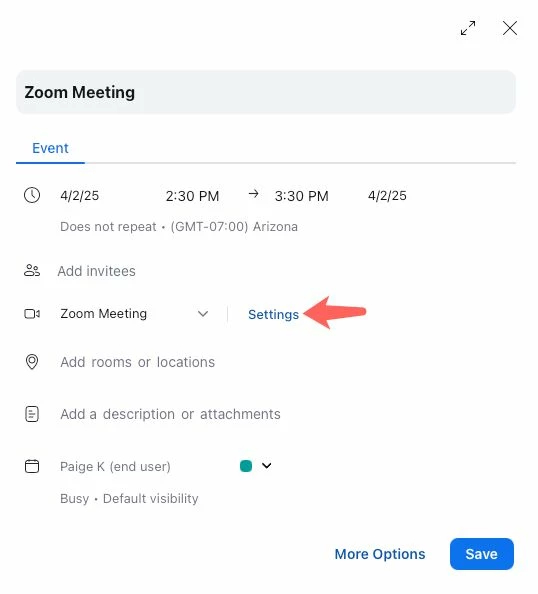
  • This is what it may look like if you have the calendar and contacts integration enabled. Alternative hosts and other meeting settings can be found by clicking Settings.
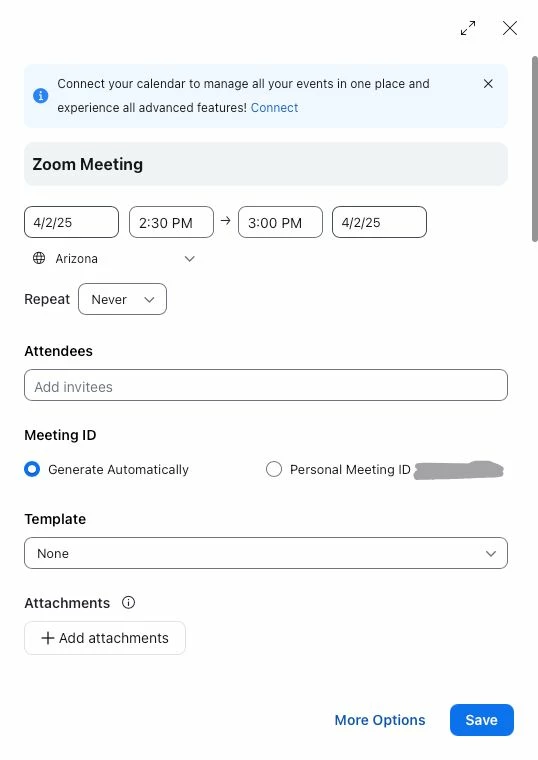
  • This is what it may look like if  you don't have the calendar and contacts integration enabled. Scroll to the bottom, click Advanced, then add alt hosts.

2 replies

PK76_2
Employee
PK76_2Answer
Employee
April 2, 2025

Hey @RLGJenna ! You should still be able to add alternative hosts to your meeting when scheduling it on the Zoom desktop app. 

Can you confirm what you see when you're scheduling on the desktop app? And what version of the app you're on? There have been some UI changes lately so it might be in a different spot than you're used to.


Do either of these match what you see?

  • This is what it may look like if you have the calendar and contacts integration enabled. Alternative hosts and other meeting settings can be found by clicking Settings.
  • This is what it may look like if  you don't have the calendar and contacts integration enabled. Scroll to the bottom, click Advanced, then add alt hosts.
RLGJennaAuthor
Newcomer
April 2, 2025

I see you're right! I didn't use to have to to dig into a meeting settings sub-menu (it was just at the bottom of the advanced expanded options). That's clunky. At least it's still there! Thanks for your help!