

Access request for Zoom Client to Outlook using the Outlook Plugin | Community
Skip to main content
Community Champion | Partner
March 14, 2023
Solved

Access request for Zoom Client to Outlook using the Outlook Plugin

  • March 14, 2023
  • 6 replies
  • 3 views

Hello community


after installing the Outlook Plugin and set Outlook to Autostart the user receives every day the same PopUp and we are not able to solve the issues.

Tried to uninstall and reinstall the Plugin, Outlook and Zoom Client does not solve the issues, are there anyone who knows how to solve this issue?

Please note thet there are other Plugins for Outlook installed that needs access but we do not have any issues with those.
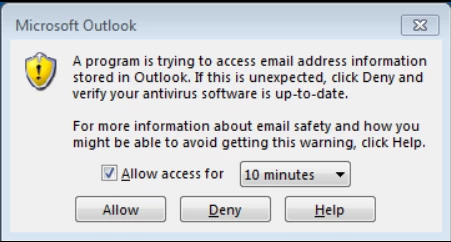
Thanks in advance!


    Best answer by Calvo

    As our customer could not implement such a workaround (starting Zoom Client with a delay of 60sec.) I suggested the Zoom Support to implment a solution to solve this issues also for all other that has this setup.

    I got today the information form the support:


    I am expecting that we will be able to. resolve this issue for you after the weekend. We are currently in a change freeze period and therefore unable to make the configuration changes on the backend.


    After testing on my VM I can see that this issue is now solved


    cheers

    calvo


    6 replies

    CalvoAuthor
    Community Champion | Partner
    March 14, 2023

    The User has installed the newest Version of the Outlook Plugin and also for the Zoom Client.
    Outlook in Version 2019


    Thanks


    Community Champion | Employee
    March 14, 2023

    Hi, @Calvo .


    A couple ideas come to mind but I would recommend following Microsoft lead here: https://support.microsoft.com/en-us/office/i-get-warnings-about-a-program-accessing-email-address-information-or-sending-email-on-my-behalf-86cc5ece-379e-45e3-b8eb-3fefba09946b 


    Is customer using MAPI in their calendar integration? Check if everything is up to date. If issues persist, I would recommend opening a support ticket with Zoom tech support.


    For reference:

    https://support.zoom.us/hc/en-us/articles/360052953851-Client-based-calendar-integration 

    https://learn.microsoft.com/en-us/office/client-developer/outlook/mapi/outlook-mapi-reference


    CalvoAuthor
    Community Champion | Partner
    March 14, 2023

    Hi

    thanks for your reply!

    I have opened in the past a case for this issue but the zoom support only mentioned that this should be a Outlook issue.

    I will check and let you know if your hints helped me.

    BR
    Calvo


    CalvoAuthor
    Community Champion | Partner
    March 15, 2023

    Hi @ZoomZoom 

    yes exactily the customer is using a MAPI integration.
    I could now recreate the issues on my VM and everytime I start the VM I get the Windows too..

    The strange thing about antivirus is that I run all windows embeded security Tools and they are up to date.

    So this could not be the case.

    Customer is verifying on their side if the impact could be from their Atntivirus.

    In parallel I opened a support case.


    cheers

    calvo


    CalvoAuthor
    Community Champion | Partner
    March 16, 2023

    @ZoomZoom 

    Thanks for your hint.  I could figure out that this has something to do with the Outlook Client that are checking the status with the antivirus (in our customers case it is Symantec endpoint protection.

    So this means that if the customer put everything into the autostart he will get the issue everytime when the users start their windows.
    Workaround:

    Put a delay of approx. 60 sec. to start the Zoom Client this gives time to the Outlook client to check the status with antivirus and the issue is gone.


    I have already updated the case


    cheers

    Calvo


    CalvoAuthorAnswer
    Community Champion | Partner
    May 5, 2023

    As our customer could not implement such a workaround (starting Zoom Client with a delay of 60sec.) I suggested the Zoom Support to implment a solution to solve this issues also for all other that has this setup.

    I got today the information form the support:


    I am expecting that we will be able to. resolve this issue for you after the weekend. We are currently in a change freeze period and therefore unable to make the configuration changes on the backend.


    After testing on my VM I can see that this issue is now solved


    cheers

    calvo