

API Scope "report:read:admin" greyed out in App permissions | Community
Skip to main content
Newcomer
November 29, 2021
Solved

API Scope "report:read:admin" greyed out in App permissions

  • November 29, 2021
  • 2 replies
  • 7 views

Hi All,


  • We're looking to add the report:read:admin scope to our app's integration to Zoom OAuth.

This is to have Zoom send registered meeting participant's leave_time and duration back to our app (using JSON) for our internal past meeting participant reports.


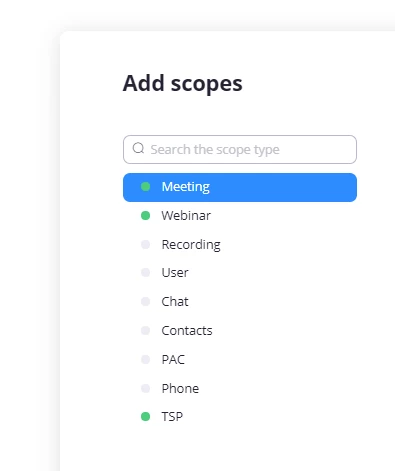
  • In our app's Zoom Marketplace, under  > Installed Apps > Fugent Dev > Scrolling down to App Scopes the report:read:admin scope is not included and the option to add it is unavailable.
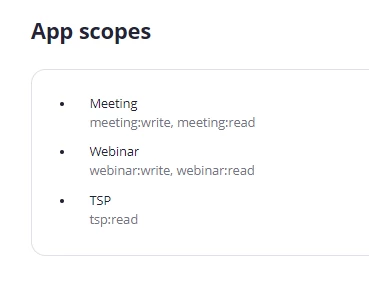
  • Our plan is Basic (free), not subscription - could this be what is causing any report scopes to be unavailable?

Screen shot of scopes currently available ( no report level scopes)
 

Thanks,


Rich.



    Best answer by YaBoiB

    Hello @RichCivi 


     That is great to hear. If you do not mind, can you please accept the solution if you are content with the solution I provided to you? 


    I hope you have a great day and please come back to the community.zoom.com if you have any other questions that we can answer for you. 


    Regards, 

    B!

    2 replies

    YaBoiB
    Community Champion | Employee
    Community Champion | Employee
    December 8, 2021

    Hello @RichCivi


     Correct the prerequisite for that functionality is a Pro level account or higher at this time. There may be a workaround here if you would like to check https://marketplace.zoom.us/docs/guides


    Another resource is available as well. https://devforum.zoom.us/t/marketplace-where-are-the-scopes-reportadmin-zmsread/28016


    Regards,

    B!

    RichCiviAuthor
    Newcomer
    December 8, 2021

    @YaBoiB 


    Hello - thanks for following up. Yes, I think you're correct-  so have gone ahead with the pro plan!


    Cheers,

    RichCivi

    YaBoiB
    Community Champion | Employee
    YaBoiBAnswer
    Community Champion | Employee
    December 8, 2021

    Hello @RichCivi 


     That is great to hear. If you do not mind, can you please accept the solution if you are content with the solution I provided to you? 


    I hope you have a great day and please come back to the community.zoom.com if you have any other questions that we can answer for you. 


    Regards, 

    B!