

Unsolicitated emails | Community
Skip to main content
Newcomer
August 29, 2025
Solved

Unsolicitated emails

  • August 29, 2025
  • 1 reply
  • 6 views

Received an unexpected email from Secure Zoom Document with an invitation to View an attached document.  Don't know the sender.  As a CPA and Tax Preparer I do not open attachments that are emailed.  I have no idea why I got this and no way of determining whether its legit.  Tried other ways to tell Zoom but since I am on a free version, no luck


T


Best answer by aileenfelix

Hi JoanneEaz - Welcome to the Zoom Community. 


Typically, when a Zoom Document is shared to a user, the email should:

  • come from this email address
  • the name of the person who tried to share the document with you should be stated on the email. If you don’t know the person, don’t open the email. If you know the sender, contact that person to verify if he did shared a document for you to open
    • Example: John Doe invited you to edit “Document 1” /  John Doe invited you to comment on “Document 1”

Here are my recommendations on how to check if it's legit: 

  • Go directly to https://zoom.us and sign into your account
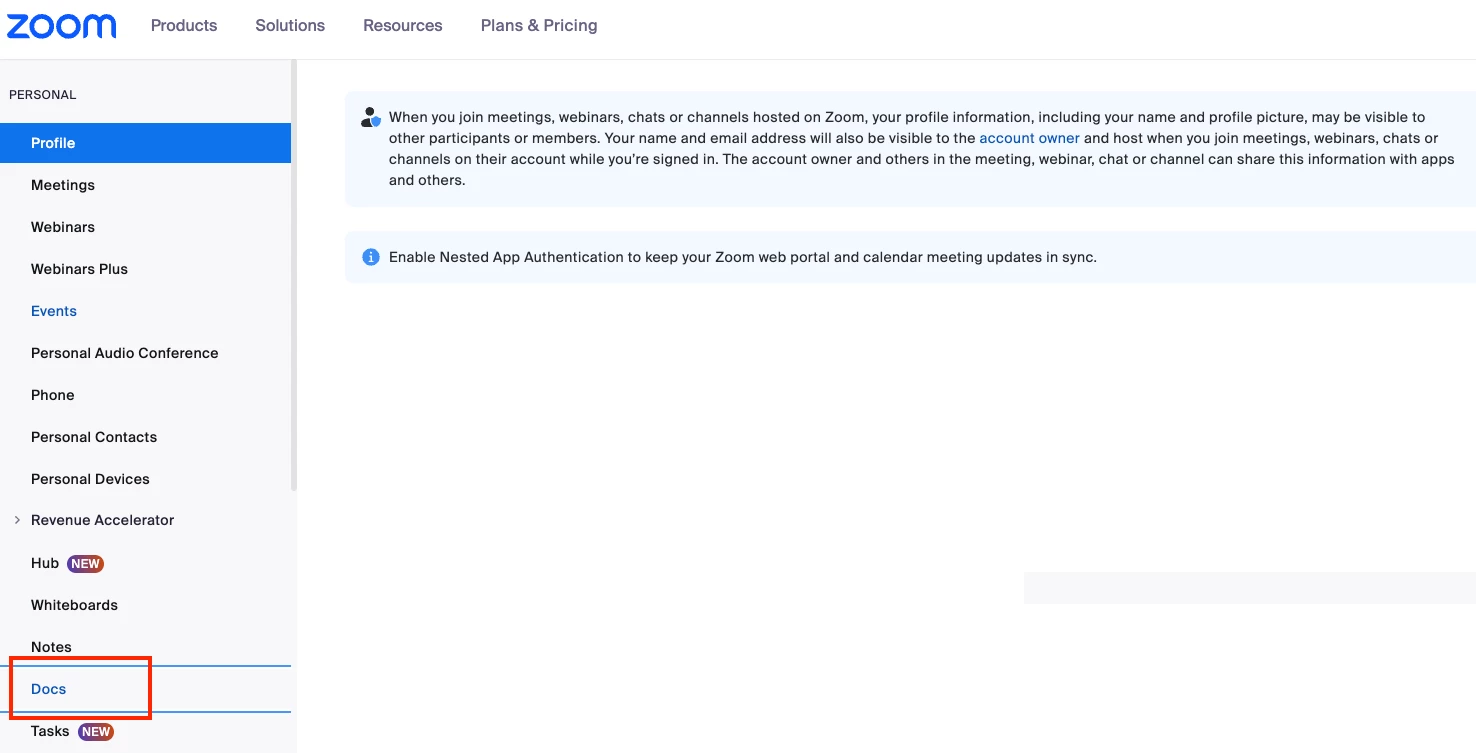
  • Check the Docs Section and see if there’s any document there, if there’s none, it’s likely a scam/phishing email. Please see sample below

    You can also go to the Zoom Desktop App, click on the “Docs” icon from the toolbar (if you don’t see it in the toolbar, try to click on “More”). In here you should see all the Documents you own, including those that are shared with you. If there’s none, it’s likely a scam/phishing email. Please see sample below.

    Lastly, you can report any suspected fraud on your account to Zoom. Here's the support article that details how: https://support.zoom.com/hc/en/article?id=zm_kb&sysparm_article=KB0062015


    I hope these steps help.  😀


1 reply

Employee
September 2, 2025

Hi JoanneEaz - Welcome to the Zoom Community. 


Typically, when a Zoom Document is shared to a user, the email should:

  • come from this email address
  • the name of the person who tried to share the document with you should be stated on the email. If you don’t know the person, don’t open the email. If you know the sender, contact that person to verify if he did shared a document for you to open
    • Example: John Doe invited you to edit “Document 1” /  John Doe invited you to comment on “Document 1”

Here are my recommendations on how to check if it's legit: 

  • Go directly to https://zoom.us and sign into your account
  • Check the Docs Section and see if there’s any document there, if there’s none, it’s likely a scam/phishing email. Please see sample below

    You can also go to the Zoom Desktop App, click on the “Docs” icon from the toolbar (if you don’t see it in the toolbar, try to click on “More”). In here you should see all the Documents you own, including those that are shared with you. If there’s none, it’s likely a scam/phishing email. Please see sample below.

    Lastly, you can report any suspected fraud on your account to Zoom. Here's the support article that details how: https://support.zoom.com/hc/en/article?id=zm_kb&sysparm_article=KB0062015


    I hope these steps help.  😀


JoanneEazAuthor
Newcomer
September 4, 2025

Wasn’t fraud yet, but I suspected phishing.  Just trying to warn others.
