

Newcomer
Nov 18, 2024 7:22 PM UTC
Solved

Acuity appointments not showing up on Zoom anymore

I use Acuity for my scheduling and it is integrated with Zoom.  While the appointment shows up on my google calendar and acuity calendar, when I open up Zoom it says I have no meetings.  It also gave me a message that I had to connect my calendar, which is weird b/c this used to work fine, and then it made me create a Zoom mail account.  When I then tried to also link my google calendar, (thinking this might help), it said it was not available.  I have no idea what to do.   I am using Zoom workplace.  Any support here would be gratefully appreciated.


mdwpsydAnswer
Explorer
Jul 3, 2025 3:32 PM UTC

Two possible solutions:

  1. If you recently changed your Zoom login information (User ID, email, phone, or password), disconnect and then re-connect Zoom within Acuity Scheduling. Within Acuity: Integrations » Integrations you're using » Zoom » Edit » [scroll down] Disconnect Account » [save or confirm, if needed] → Refresh browser, then go back to » Integrations » Select Zoom, and following instructions from there.
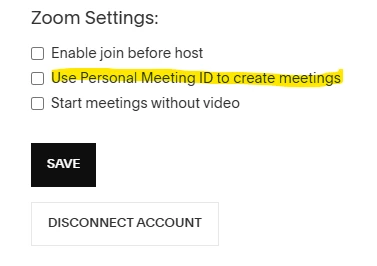
  2. I am not sure if this will work for everyone, but when I had this problem (as described by OP), I learned that I needed to Uncheck "Use Personal Meeting ID to create meetings" in Zoom Settings. Within Acuity: Integrations » Integrations you're using » Zoom » Edit » [scroll down to] Zoom Settings » If enabled (checked, toggled on), disenable (uncheck, toggle off) "Use Personal Meeting ID to create meetings".

4 replies

Newcomer
Nov 22, 2024 3:30 AM UTC

This comes down to the API integration. Acuity meetings don't show up in your Zoom workspace account but will be added to your gmail calendar. You could set up a webhook to reflect your Acuity meetings in one interface to join. Alternatively there is a Zoom app, Salepager, that lets you join all your Zoom meetings from one location including those scheduled via Acuity.

Translate
mdwpsydAnswer
Explorer
Jul 3, 2025 3:32 PM UTC

Two possible solutions:

  1. If you recently changed your Zoom login information (User ID, email, phone, or password), disconnect and then re-connect Zoom within Acuity Scheduling. Within Acuity: Integrations » Integrations you're using » Zoom » Edit » [scroll down] Disconnect Account » [save or confirm, if needed] → Refresh browser, then go back to » Integrations » Select Zoom, and following instructions from there.
  2. I am not sure if this will work for everyone, but when I had this problem (as described by OP), I learned that I needed to Uncheck "Use Personal Meeting ID to create meetings" in Zoom Settings. Within Acuity: Integrations » Integrations you're using » Zoom » Edit » [scroll down to] Zoom Settings » If enabled (checked, toggled on), disenable (uncheck, toggle off) "Use Personal Meeting ID to create meetings".

Translate
MGSR
Community Manager
Community Manager
Jul 10, 2025 9:22 PM UTC

Hi @Xanetp!

Did you see the previous response from @mdwpsyd?
If it has resolved your inquiry, please press Accept as Solution.

If you need further assistance, please let us know.

Have a great day!

Translate