

Zoom Workplace 中 My Notes 的转写文字突然无法选中或复制 | Community
Skip to main content
New Member
July 22, 2026
Question

Zoom Workplace 中 My Notes 的转写文字突然无法选中或复制

  • July 22, 2026
  • 1 reply
  • 74 views

我在 Windows 版 Zoom Workplace 的 Hub → My Notes 中遇到了转写文字无法复制的问题。

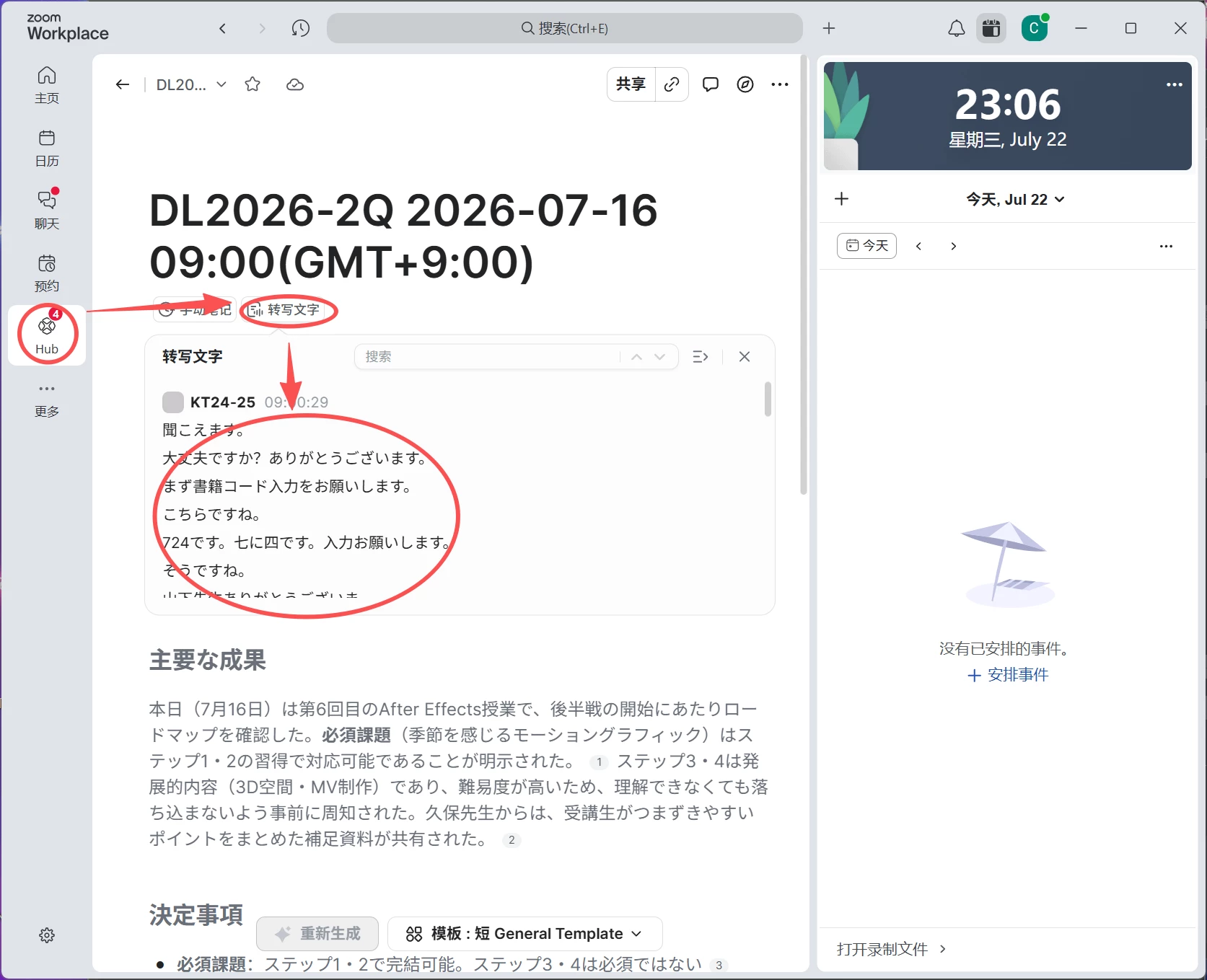
此前,我可以直接用鼠标选中“转写文字”面板中的内容并复制,但现在该功能突然失效。无论是在文档内嵌的转写框中,还是点击右上角按钮展开完整转写面板后,都无法用鼠标选中文字,也无法复制所需段落。

复现步骤:

  1. 打开 Windows 版 Zoom Workplace。
  2. 进入 Hub → My Notes
  3. 打开一条已经生成转写文字的会议笔记。
  4. 点击“转写文字”。
  5. 尝试用鼠标拖动选中其中的文字。
  6. 点击转写框右上角的展开按钮,在完整转写面板中再次尝试。

实际结果:

鼠标可以滚动和搜索转写内容,但无法选中任何文字,因此不能复制。展开转写面板后问题仍然存在。

预期结果:

应该能够像以前一样,用鼠标选中任意一段转写文字并通过 Ctrl+C 复制,而不必复制整份摘要或下载其他文件。

环境:

  • 操作系统:Windows
  • 应用:Zoom Workplace 桌面客户端
  • 功能位置:Hub → My Notes → 转写文字
  • 问题出现时间:2026 年 7 月22日
  • Zoom 版本:7.0.5 (38856)

该问题以前不存在,近期才开始出现。请问这是新版界面的预期变化,还是已知问题?是否有恢复文字选择和复制功能的方法?
 

    1 reply

    Community Manager
    July 27, 2026

    Hello, ​@CHEN ZEYU 12629042! I apologize for the delayed response and for not catching this sooner. I wanted to follow up with you and see whether this issue is still affecting you.

    We found that the problem was caused by a recently released setting that allows organizations to disable copying and downloading of My Notes transcripts. Due to an issue during the feature rollout, the change unintentionally impacted some users.

    We’ve since rolled back the change and restored the previous behavior. Additionally, the “Disable the ability to copy or download transcripts” feature has been removed from the current release due to deployment issues and will be introduced again in a future release once those issues have been resolved.

    You should now be able to download or copy transcripts again where applicable. If you’re still seeing any issues, please let us know. We’d be happy to continue working with you to get this resolved.