

Speakers not receiving email for published, free, recurring event. | Community
Skip to main content
New Member
March 3, 2026
Question

Speakers not receiving email for published, free, recurring event.

  • March 3, 2026
  • 2 replies
  • 20 views

Hi - I’ve just published a recurring weekly event. We will have different team members covering sessions, so I didn’t have any speakers added when I published. 

I’m adding speakers now and they are not receiving the email invite with calendar link.

The sessions are published. 

Registration is required.

They all have special role of speaker. They’ve all been added as “speaker.”

I’m adding them per session here:
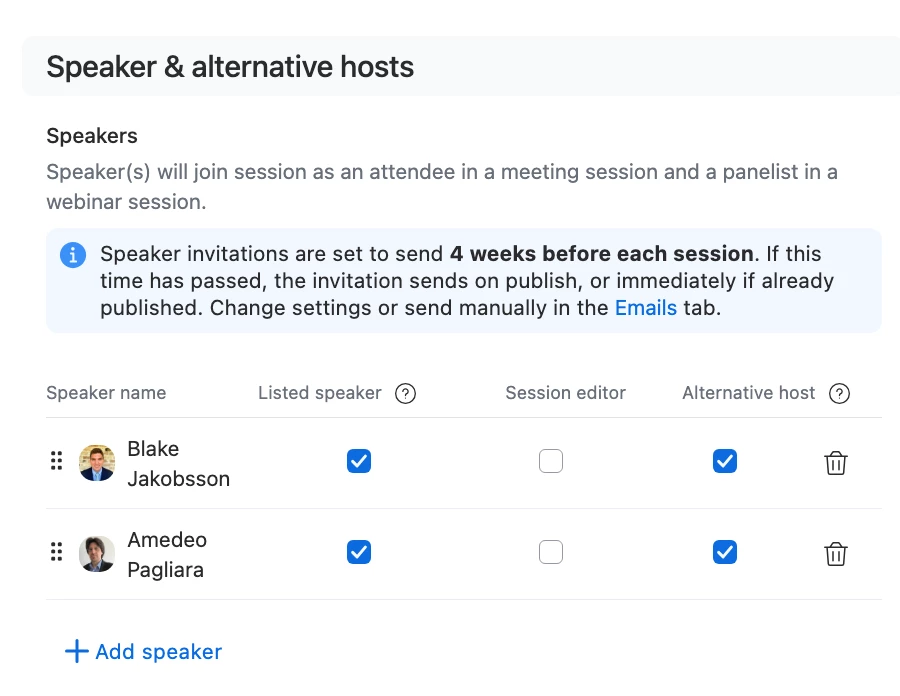
 

The speaker session join details email is scheduled for 4 weeks out - but sessions start next week. 

 

Am I missing something? Is there a way to set these to send as soon as I add someone as a speaker? Or is there even a way for me to manually send them?

2 replies

ExpertswhoJohn
Community Super Champion | Customer
March 4, 2026

hi ​@KGastaldo 

There are two layouts of zoom events, but you should still be able to find on both the new and old versions.

Look for direct links to send out a link to a speaker
 

Or else you can click on the name of the speaker and you should see a popup which will include their link for you to send to them
 

Please like and mark as the solution if this helps

All the best


John Drinkwater

Independent Zoom Strategy Consultant

Zoom Community Super Champion.

Zoom Developer Champion

https://www.linkedin.com/in/johndrinkwaterlordzoom/

See my latest content. events, live and prerecorded to showcase features

https://lordzoom.com/go/hub

I run many events and upload most on my channel.

https://www.youtube.com/@boomwithlordzoom


KGastaldoAuthor
New Member
March 4, 2026

Thanks John. When I look, it says they’ve all been invited … but they haven’t received an email. 

I can send them the link to join, but that doesn’t give them the event invite to add to their calendar. Any idea why the email isn’t sending? Or how to manually send it?

KGastaldoAuthor
New Member
March 4, 2026

Issue solved with the AI support bot. This is what I had missed: 

If your speakers aren't receiving the speaker invite email in Zoom Events, please check the following:

  • Make sure you selected the Session Editor checkbox for each speaker.
  • Click Invite speaker to edit this session after adding the speaker.
  • The invitation is only sent to speakers with the Session Editor box checked.

If these steps were not completed, the invite email will not be sent.