

Explorer
Oct 16, 2026 2:56 PM UTC
Question

Name tag issues in Production Studio

I am using Production Studio and branded name tags.   I set up the name tags with a dark background and white text.  They show up great in preview, but when going live the name tag background is white.  Has anyone else faced this and if so, what was the solution?  
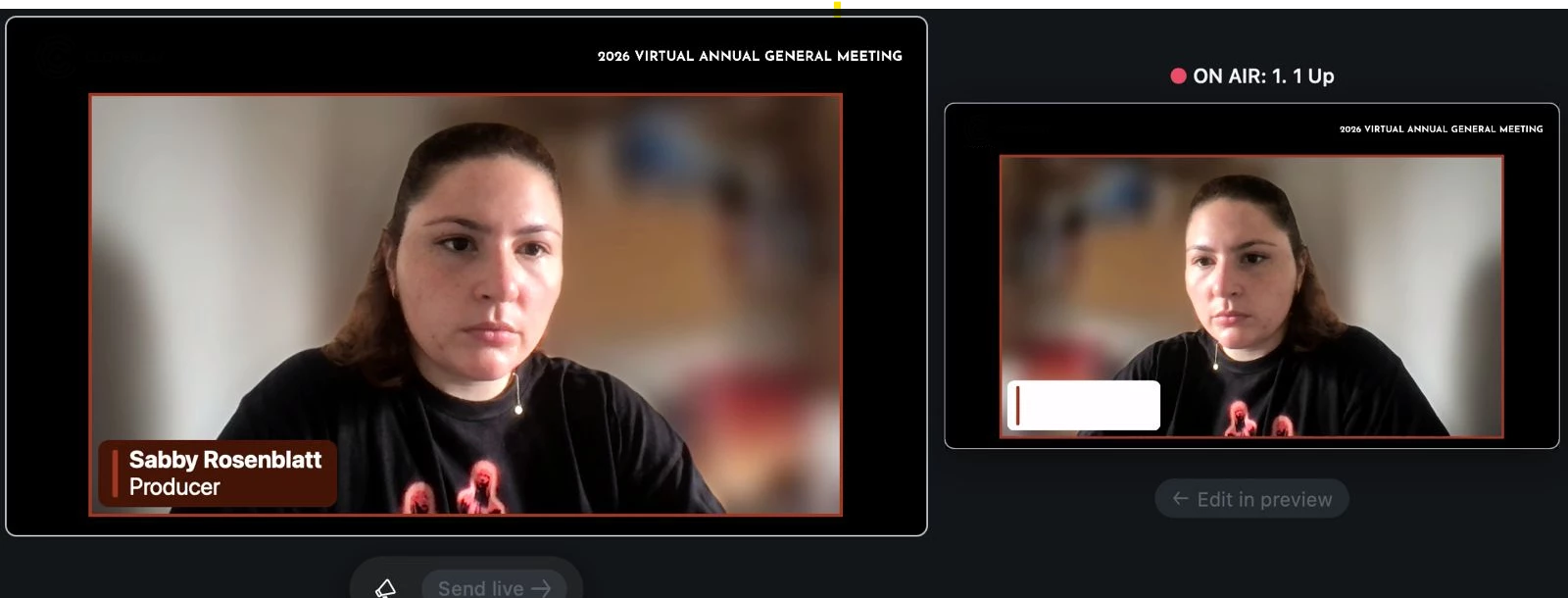
Thanks - Louis

3 replies

Community Manager
Oct 20, 2026 8:23 PM UTC

Hello, ​@LouisTrahan! Welcome to the Zoom Community!

I can imagine how frustrating it must be to have your name tags looking just right in preview, only for the background to turn white once you go live. Let’s try a few things to narrow down what might be happening.

In Zoom Events, open the session and go to In-Session Branding. Reapply your name tag colors, making sure the background is dark and the text is white, then save your changes.

If you initially set up the branding at the event level, it’s also worth checking the settings for the individual session to make sure the correct style is applied.

Still seeing a white background? Let’s try a quick test. Change the name tag background to a bright color, like red, save your changes, and go live briefly to see if the new color appears.

  • If the color changes, the session may be using a different branding configuration than expected.
  • If it stays white: The live output may not be applying the saved style correctly, and we may need to investigate further.

If you’ve already tried these steps, let us know if this happens in just one session or across all your Production Studio sessions and whether the white background appears on all name tags or only for specific panelists. That’ll help us narrow down the issue.

Hopefully, we can get to the bottom of this soon. I hope this helps!

Translate
Explorer
Oct 20, 2026 9:26 PM UTC

Thanks Don.  The problems seem to have sorted themselves out.  A couple of days after this post we did another tech check and all where working. We hadn't made any changes.  Maybe it was just a temporary bug.  During. The actual event earlier today they worked fine again.  Appreciate your response though - thank you.

Translate
Community Manager
Oct 20, 2026 9:30 PM UTC

You’re very welcome, Louis! Glad to hear everything sorted itself out and worked fine during the event. Hopefully it was just a temporary glitch, but if it happens again or anything else comes up, don’t hesitate to reach out. Thanks for the update, and I hope your future events go smoothly!

Translate