

Lobby homepage: unable to select GOLD and SILVER Sponsors as "Featured sponsors" | Community
Skip to main content
Newcomer
April 15, 2026
Solved

Lobby homepage: unable to select GOLD and SILVER Sponsors as "Featured sponsors"

  • April 15, 2026
  • 2 replies
  • 100 views

Hi everyone 👋
I try do display several “Featured sponsors” on the lobby homepage.
I can only see PLATINUM Sponsor in the setting list.
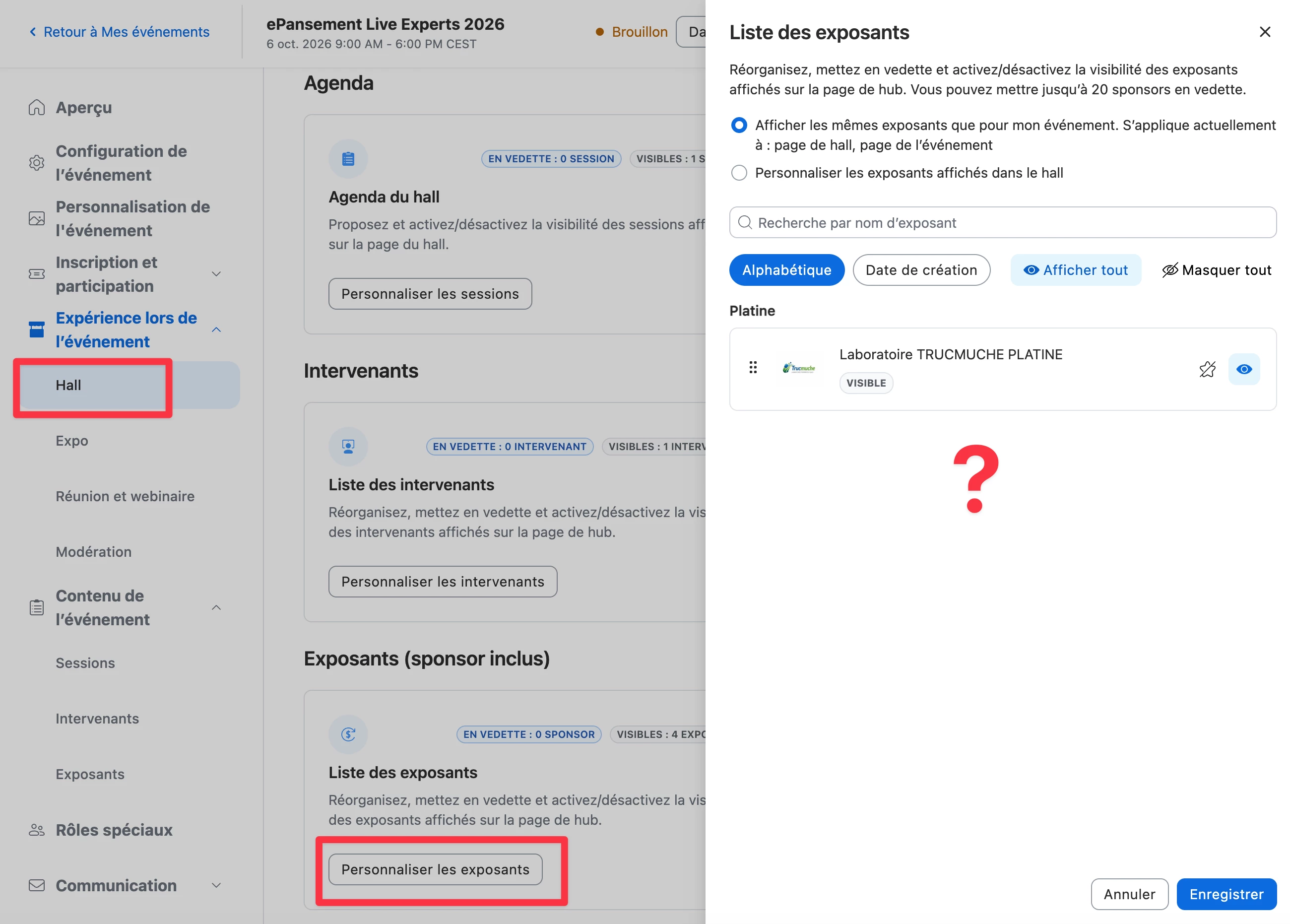
I cant see GOLD and SILVER sponsors although the documentation mentions “The Edit featured sponsors panel will appear containing a list of your sponsors categorized by tier.”

https://support.zoom.com/hc/en/article?id=zm_kb&sysparm_article=KB0058086

Thanks for helping


    Best answer by VianneyP

    After reaching the Zoom Support which investigate deeply the issue : the language setting is the problem.
    In reality, it’s not the browser’s language setting that prevents the list of sponsors (other than Platinum) from displaying, but the language configured in the Zoom account.
    A temporary workaround until the bug is fixed (“Next few months” say Zoom Support) : change the language from French to English. You’ll then see that all sponsors are displayed. I can then select the desired “Featured sponsors.” These display correctly in the lobby preview. Then, change the Zoom account language back to French: the “Featured sponsors” are still present in the lobby, even though they have disappeared from the selection list.

    2 replies

    ArvinG
    Employee
    Employee
    April 16, 2026

    Hi there!

    The Edit featured sponsors panel should display all sponsors categorized by tier. There are no tier-based restrictions on which sponsors can be featured, and you can feature up to 20 sponsors in total. Zoom Events includes three default tiers: Platinum, Gold, and Silver, and all of them should be available to select as featured sponsors.

    If you're only seeing Platinum sponsors, it's worth confirming that your Gold and Silver sponsors have been added under each tier in the event's Exhibitors tab. Sponsors must be added there before they can appear in the expo or lobby configuration.

    If everything looks correct and the Gold and Silver tiers still don't appear, I'd recommend reaching out to Zoom Support so they can take a closer look.

    Hope this helps!

    VianneyPAuthor
    Newcomer
    April 17, 2026

    Thanks ​@ArvinG for helping,
    I confirm that in addition to Platinum sponsor, I had created Gold and Silver sponsors in the event’s Exhibitors tab (see screenshot below) .


    Unfortunately, as I explained in my first post, Gold and Silver sponsors still don’t appear in the exhibitors list of the Lobby tab.
    I”m reaching the Zoom Support and will share here the solution.
    Thanks.

    VianneyPAuthorAnswer
    Newcomer
    April 22, 2026

    After reaching the Zoom Support which investigate deeply the issue : the language setting is the problem.
    In reality, it’s not the browser’s language setting that prevents the list of sponsors (other than Platinum) from displaying, but the language configured in the Zoom account.
    A temporary workaround until the bug is fixed (“Next few months” say Zoom Support) : change the language from French to English. You’ll then see that all sponsors are displayed. I can then select the desired “Featured sponsors.” These display correctly in the lobby preview. Then, change the Zoom account language back to French: the “Featured sponsors” are still present in the lobby, even though they have disappeared from the selection list.